Cannot find module 'igniteui-angular'
New Discussion
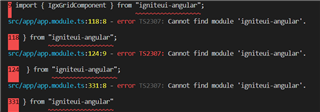
i am getting Cannot find module ‘igniteui-angular’ after upgrading to licensed version.
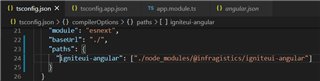
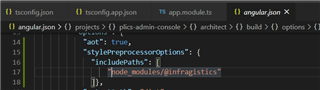
followed the steps given here
Visual studio code is not showing any error. but while using ng serve error is thrown.

Sign In
to post a reply
Replies

- You must be logged in to reply to this topic.
Discussion created by
Favorites
Replies
Created On
Last Post
Discussion created by
 Gautam Singh
Favorites
0 Replies
1 Created On
Jun 30, 2020 Last Post
5 years, 8 months ago Suggested Discussions
DISCUSSION
VIEWS
REPLIES
LAST POST
Angular Schematics error : Collection "@igniteui/angular-schematics" cannot be resolved
Installed : C:\_ng\new_ig1>npm i -g @igniteui/angular-schematics then run command below, and got…

VIEWS
830,650
REPLIES
9
LAST POST
4 years, 7 months ago Angular 2 and AoT : Cannot determine the module for class
I have followed the steps here https://github.com/IgniteUI/igniteui-angular2 to try to us…


VIEWS
64,836
REPLIES
5
LAST POST
8 years, 7 months ago Unable to upgrade Igniteui angular and angular versions
Dear team, I am trying to upgrade my angular v13 and igniteui-angular@13.1 to latest. But I am ge…

VIEWS
203,394
REPLIES
3
LAST POST
2 years, 8 months ago How to show selected value(default value) using IgniteUI Combobox in Angular
I need to show the selected value while loading the page. How it is possible using your angular con…

VIEWS
104,717
REPLIES
3
LAST POST
7 years, 1 month ago 