XamPivotGrid FlatDataSource Sorting Rows and Columns
New Discussion
I have a dataSource with ProjectData and I created a FlatDataSource with the following code:
dataSource = new FlatDataSource()
{
    ItemsSource = data,
    Cube = DataSourceBase.GenerateInitialCube(viewMode),
    Rows = DataSourceBase.GenerateInitialItems($"[{nameof(ProjectData.Project)}].[{nameof(ProjectData.Project)}]"),
    Columns = DataSourceBase.GenerateInitialItems($"[{nameof(ProjectData.VNSprint)}].[{nameof(ProjectData.VNSprint)}]"),
    Measures = DataSourceBase.GenerateInitialItems(nameof(ProjectData.Duration))
};
return dataSource;
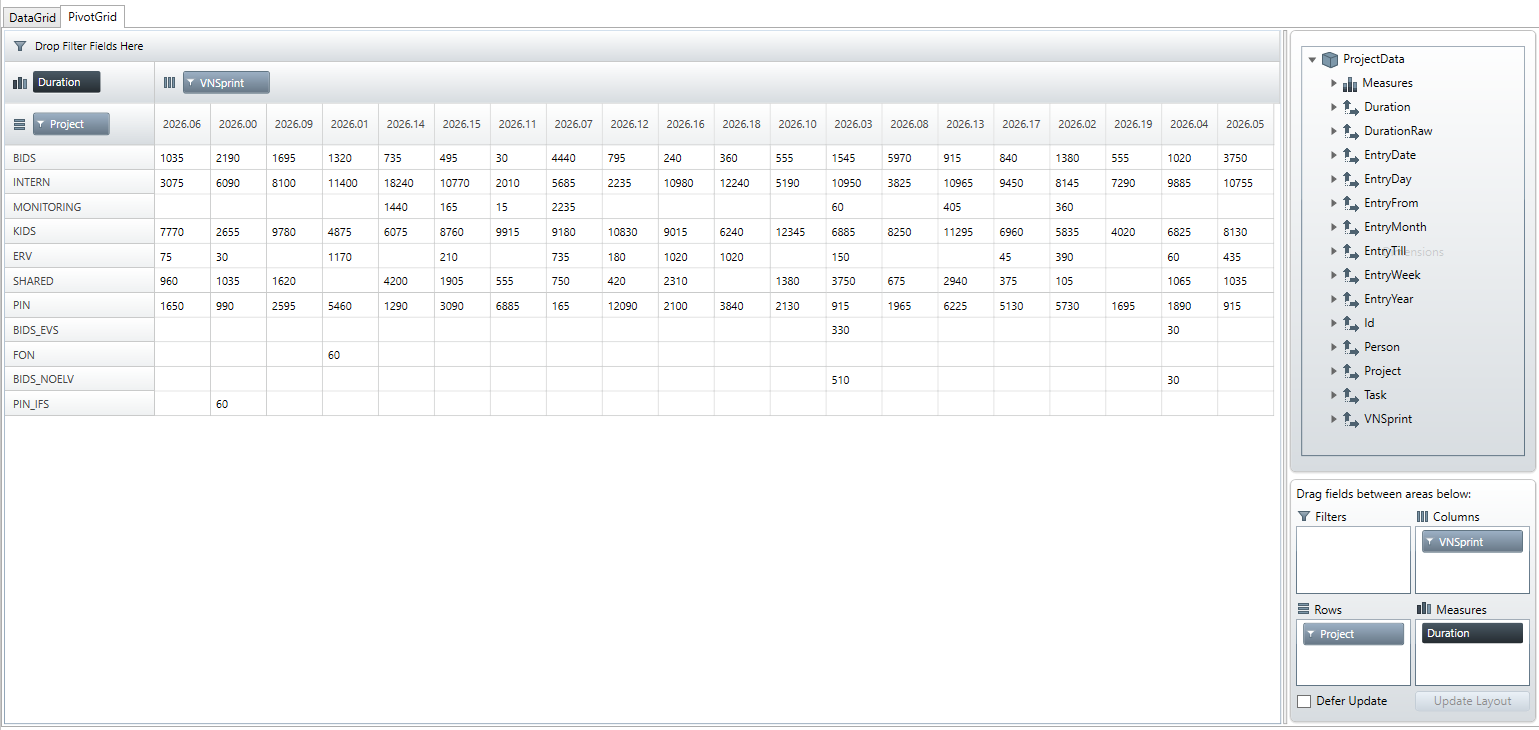
but the output does not sort the columns or rows itsself. How can I set the order of rows and columns to that the columns (column-headers) are in the correct order: so columns should be ordered liked: 2026.01, 2026.02, 2026.03, etc.
rows should be ordered alphabeticly.
I want to enforce the sorting by code – but also with the given UI, its not possible to sort the data. I dragged the “project” field into “rows” but the row order is very random. How can I, as user of the UI, sort the rows by projectnames?

Attachments:

Sign In
to post a reply
- You must be logged in to reply to this topic.
