Skip to content

Infragistics Community Forum / Web / Ignite UI for jQuery / Timezone offsets showing in times in Excel export

Timezone offsets showing in times in Excel export

New Discussion
Nathan Green
Nathan Green asked on Feb 28, 2023 7:46 AM

Hi,

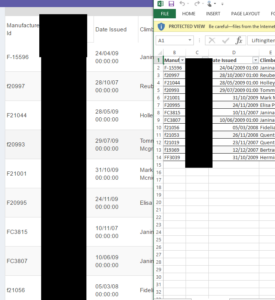
When I export data from the grid to Excel I’m getting +1hr timezone offsets on some dates, because of DST adjustments in the UK I’m guessing.  The dates in my datasource don’t have time offsets, so I think the grid (or maybe moment?) is introducing these?  How can I turn that off and have the dates exported as they are shown in the grid without time offsets added?

Sign In to post a reply

Replies
  • 0
    Nathan Green
    Nathan Green answered on Apr 21, 2017 8:48 PM

    This is a screenshot that shows how the values in the grid differ from the export


    • 0
      Hristo Anastasov
      Hristo Anastasov answered on Apr 25, 2017 10:03 AM

      Hello,

      Thank you for the detailed information provided.

      When receiving data from a backend, the igDataSource class recreates the data on the client as well. When creating date objects on the client though, the date is always created in local time, so this introduces a difference. Though the igGrid is formatting this data based on tne enableUTCDates property, the igGridExcelExporter takes the client data and export it to the Excel worksheet, so in the end we may see such variations as in your case.

      Possible resolutions are:

      • if enableUTCDates is set to false, then the igGrid will not format the client data and there will be no differences between dates displayed in igGrid and exported Excel worksheet.
      • interfere the exporting process by attaching to the cellExporting event and either changing the value written to the cell, or applying Excel formula that will format the display
      • keep the enableUTCdates property to true, and place an additional hidden column in igGrid that will display date as if enableUTCDates is false. This column will be exported in the worksheet instead of the original one.

      I recommend going for the last approach and I will attach a sample demonstrating how to achieve it shortly.

      • 0
        Hristo Anastasov
        Hristo Anastasov answered on Apr 25, 2017 11:56 AM

        Hi,

        Here is a sample demonstrating the last approach. Please let me know if you have further questions.


        igGridExportDates

      • 0
        Nathan Green
        Nathan Green answered on Apr 27, 2017 11:30 AM

        Hi Hristo

        Sorry, I'm a bit confused, why is it introducing a difference?  Is that because the server and client are in different timezones, or is there some other reason?

        Thanks, Tom

      • 0
        Hristo Anastasov
        Hristo Anastasov answered on Apr 27, 2017 12:26 PM

        Hello Redox,

        As my example shows, creating a date on the server happens as:

        ReleaseDate = new DateTime(2015, 1, 10, 7, 0, 0, 0) // 10.01.2015 07.00 AM

        The Kind property,  that indicates whether the time represented by this instance is based on local time, Coordinated Universal Time (UTC), or neither, is initialized to DateTimeKind.Unspecified by default. Before rendering the grid, its data is recreated on the client. When a new date is created in JavaScript it will always be created in local time, which is:

        07:00 AM + 3:00 (if the timezone offset on the server is +3 hours) = 10:00 AM

        This is the date the igGridExcelExporter works with and it will be exported to the Excel worksheet.

        However, since enableUTCDates is true, that date is formatted to UTC (-3:00:00) for displaying in the igGrid:

        07.00 AM

        All of this is explained in more detail at https://www.igniteui.com/help/using-igniteui-controls-in-different-time-zones. Please let me know if you have further questions, I will be glad to help.

      • 0
        Nick Portelli
        Nick Portelli answered on Feb 27, 2023 10:10 PM

        So the 1st solution does not work.  I've done this, dates still display correctly, exported dates are -5 hours off and incorrect.  Is there a way to turn off UTC dates on the excel exporter?

      • 0
        Hristo Anastasov
        Hristo Anastasov answered on Feb 28, 2023 7:46 AM

        Hi Nick! Is it possible that you share the a sample app reproducing the issue or more details around?

        For example – what timezone your machine is set to and a sample of the data coming from the server, along with the grid configuration and I will be glad to have a look at it.

  • You must be logged in to reply to this topic.
Discussion created by
Favorites
Replies
Created On
Last Post
Discussion created by
Nathan Green
Favorites
0
Replies
7
Created On
Feb 28, 2023
Last Post
3 years ago

Suggested Discussions

Created by

Created on

Feb 28, 2023 7:46 AM

Last activity on

Feb 24, 2026 9:19 AM