Skip to content

Infragistics Community Forum / Desktop / Ultimate UI for Windows Forms / WInform Borderless (or set border color) with all standard buttons & titlebar

WInform Borderless (or set border color) with all standard buttons & titlebar

New Discussion
Parminder Kaur
Parminder Kaur asked on Dec 9, 2020 5:33 AM

Hello Infragistics Team,

In my C# window application, I have more than 15 winforms and all required to be borderless ( or set border color) along with all standard buttons ( close, minimized, maximized), titlebar.

Infragistic tools can be helpful in this regard.

I read about toolbarmanager/ ultraformManager tool helping in this, can you elaborate more ( means step to implement it ) or can suggest other way to get the required border of winform.

Regards,

Parminder

Sign In to post a reply

Replies

  • 0
    Ivan Kitanov
    Ivan Kitanov answered on Dec 1, 2020 2:24 PM

    Hello Parminder,

    In order to set the border color you need to change the BackColor of the FormBorderAppearance in the FormStyleSettings of the UltraFormManager. It could be done like that:

    this.ultraFormManager1.FormStyleSettings.FormBorderAppearance.BackColor = Color.[Your desired color];

    With this you would still have access to the ControlBox, which provides the close, minimize and maximize buttons, however if you decide to make the form borderless you won’t be able to access the ControlBox. Changing the form to borderless can be achieved  by setting the form's FormDisplayStyle property to standard and the ultraformManager's formBorderStyle property to None like that:

    this.ultraFormManager1.FormStyleSettings.FormDisplayStyle = FormDisplayStyle.Standard;

    this.FormBorderStyle = FormBorderStyle.None;

    Could you provide us with more information about how you expect the appearance of the form to look like when it is borderless for example do you expect the ControlBox buttons to be on the form?

    Please let me know if you need further assistance.

    Sincerly,
    Ivan Kitanov

    • 0
      Parminder Kaur
      Parminder Kaur answered on Dec 2, 2020 11:28 AM

      Hello Ivan,

      thanks for your prompt response.

      I tried the suggested step-

      this.ultraFormManager1.FormStyleSettings.FormBorderAppearance.BackColor = Color.[Your desired color];

      but , I see, no change in border color.

      is there something that is missed out, please let me know.

      • 0
        Ivan Kitanov
        Ivan Kitanov answered on Dec 2, 2020 12:29 PM

        Hello Parminder,

        This probably occurred after changing the FormDisplayStyle to Standard, this makes the form appear as how its FormBorderStyle property settings are set, which results in ignoring the change of the border color. This can be fixed by setting the FormDisplayStyle to an enumeration different than Standard or StandartWithRibbon.

        Attached you will find my sample, which demonstrates the difference in the two FormBorderStyle properties. Please test it on your side and let me know how it behaves. If this is not an accurate demonstration of what you are trying to achieve please feel free to modify it and send it back to me along with steps to reproduce. Alternatively, if the behavior cannot be replicated please feel free to provide your own sample. Remove any external dependencies and code that is not directly related to the issue, zip your application and attach it.

        Having a working sample on my side, which I can debug, is going to be very helpful in finding the root cause of this behavior.

        Please let me know if you need further assistance.

        Regards,
        Ivan Kitanov

        ChangeBorderColor.zip

      • 0
        Parminder Kaur
        Parminder Kaur answered on Dec 3, 2020 1:18 PM

        Hello Ivan,

        check the attached image, with red border (inside) form is what I get from the sample you sent.

        my requirement is for form border, which is shown in below image, just behind the form from your sample.

        border color of winform is needed to be set with control buttons( close, minimized, maximized, restore).

        check this

      • 0
        Ivan Kitanov
        Ivan Kitanov answered on Dec 4, 2020 12:43 PM

        Hello Parminder,

        I have modified the sample I previously sent to you, it now changes successfully, not only from the inside as the previous one. To do this I have changed a few properties of the FormBorderApearance such as BorderColor, BorderColor2, ForeColor and BorderColor3DBase.

        Attached you will find my sample, which demonstrates the change to the border color stated above. Please test it on your side and let me know if it meets your requirements. If this is not an accurate demonstration of what you are trying to achieve please feel free to modify it and send it back to me along with steps to reproduce, alternatively feel free to provide your own sample.

        Please let me know if you need further assistance.

        Regards,
        Ivan Kitanov

        5670.ChangeBorderColor.zip

      • 0
        Parminder Kaur
        Parminder Kaur answered on Dec 4, 2020 1:35 PM

        Hello Ivan,

        The sample you sent, woking fine except

        this.ultraFormManager1.FormStyleSettings.FormDisplayStyle = Infragistics.Win.UltraWinToolbars.FormDisplayStyle.Standard;

        my requirement is : winform standard look with border color other than black.

      • 0
        Ivan Kitanov
        Ivan Kitanov answered on Dec 4, 2020 3:21 PM

        Hello Parminder,

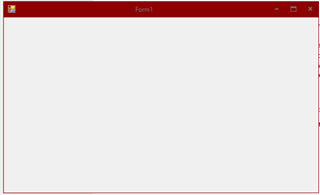
        If you set the FormDisplayStyle to standard the form keeps its standard look based on its FormBorderStyle property, however in the sample that I provided I am changing the properties of the UltraFormsManager so if you set FormDisplayStyle to Standard you wouldn’t see any difference in the form border. To achieve the standard look with different border color you need to set FormDisplayStyle to default, which applies the changes in the border. To make the form style like the standard one you need to set its style to Office2013, which emulates the Office 2013 look and feel. To do this you need to add this:

        this.ultraFormManager1.FormStyleSettings.Style = Infragistics.Win.UltraWinForm.UltraFormStyle.Office2013;

        I am attaching a screen shot of how the form looks like after the addition of the style changes.  

        Please let me know if you need further assistance.

        Regards,
        Ivan Kitanov

      • 0
        Parminder Kaur
        Parminder Kaur answered on Dec 7, 2020 11:26 AM

        Hello Ivan,

        Need to work on close, maximize, minimize button as they differ in look from standard winform.

      • 0
        Ivan Kitanov
        Ivan Kitanov answered on Dec 8, 2020 10:27 AM

        Hello Parminder,

        The buttons look different form the standard form because the UltraFormsManager is using Office2013 style, which is the closest in look to the default one, however you can set the buttons images to achieve your desired look. It can be done by adding these lines to your code:

        this.ultraFormManager1.FormStyleSettings.CaptionButtonsAppearances.CloseButtonAppearances.Appearance.Image = [your desired image];

                    this.ultraFormManager1.FormStyleSettings.CaptionButtonsAppearances.MinimizeButtonAppearances.Appearance.Image = [your desired image];

                    this.ultraFormManager1.FormStyleSettings.CaptionButtonsAppearances.MaximizeButtonAppearances.Appearance.Image = [your desired image];

                    this.ultraFormManager1.FormStyleSettings.CaptionButtonsAppearances.RestoreButtonAppearances.Appearance.Image = [your desired image];

        Regards,
        Ivan Kitanov

      • 0
        Parminder Kaur
        Parminder Kaur answered on Dec 9, 2020 5:33 AM

        Thank you Ivan, it really ease my work.

  • You must be logged in to reply to this topic.
Discussion created by
Favorites
Replies
Created On
Last Post
Discussion created by
Parminder Kaur
Favorites
0
Replies
10
Created On
Dec 09, 2020
Last Post
5 years, 2 months ago

Suggested Discussions

Created by

Created on

Dec 9, 2020 5:33 AM

Last activity on

Feb 12, 2026 9:54 AM