Skip to content

Infragistics Community Forum / Web / Ignite UI for jQuery / Special characters in primary key column is giving exception in hierarchical grid

Special characters in primary key column is giving exception in hierarchical grid

New Discussion
Tapas Bisoi
Tapas Bisoi asked on Mar 9, 2020 12:05 PM

Hi Team,


We have Business Services REP as parent. Once we expand Business Services REP, we will get all child columns.

responseDataKey : “EMPLOYEE_NAME”,

dataSourceType: “json”,

autoGenerateColumns : false,

primaryKey: “EMPLOYEE_NAME”


And columns –

columns: [

{key: “EMPLOYEE_NAME”, headerText: “Business Service Rep” ,dataType:”string”}]
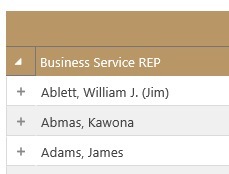
Here, the issue is – if you see the first name “Ablett, William J. (Jim)”, it has comma, dot and round brackets and if we use this column as Primary Key column we get an exception.

What we understood is that primary key column value doesn’t work with dot or round brackets.

Our requirement is we want exact same name to be displayed and also we don’t want to add any more column as Primary Key column.


How can we achieve “Ablett, William J. (Jim)” as Primary Key value or is there any other alternative we can handle this situation?

Sign In to post a reply

Replies

  • 0
    Martin Dragnev
    Martin Dragnev answered on Mar 4, 2020 12:43 PM

    Hello Tapas,

    Thank you for posting in our forum.
    As long as I understand your issue I can not reproduce it.

    How do you set that column as primary key ?
    Do you do it from the property: "columnLayouts" ?
    Could you please give me some more information about it and the version of the product you are using.

    Also, if possible attach a short sample demonstrating that specific behavior. 

    I am looking forward to your reply.

    Best Regards,
    Martin Dragnev,

    Infragistics

    • 0
      Tapas Bisoi
      Tapas Bisoi answered on Mar 4, 2020 2:15 PM

      Hi Martin,

      first node/parent node is having only 1 column which we are defining like 

      columns: [

      {key: “EMPLOYEE_NAME”, headerText: “Business Service Rep” ,dataType:”string”}]

      and we are giving EMPLOYEE_NAME as a primary key which you can see form the above code.

      Is there any way by which we can bind the hierarchical grid with the special characters primary key because as per our understanding , if primary key in iggrid is having special characters, grid is getting broken .

      • 0
        Martin Dragnev
        Martin Dragnev answered on Mar 5, 2020 9:38 AM

        Hello Tapas,

        Setting special characters in primaryKey property is known limitation in the igGrid that does not have a workaround because the jquery selector does not recognize items with special characters.

        You can read more about that here.

        Also, you can specify all of the child grids primary keys in the "columnLayouts" property.

        Please let me know if you have any additional question or concerns!

        Best Regards,
        Martin Dragnev,

        Infragistics

      • 0
        Tapas Bisoi
        Tapas Bisoi answered on Mar 5, 2020 9:45 AM

        ok, I am getting issue for parent grid which is having special characters in primary key

      • 0
        Martin Dragnev
        Martin Dragnev answered on Mar 5, 2020 10:08 AM

        Unfortunately, it is a known limitation for our grid that you can not set special characters in primary key. There is no workaround because it is not our product issue but in jQuery. Also, jQuery selectors does not work with special characters.

        Let me know if I can help with anything else!

        Best Regards,

        Martin Dragnev,

        Infragistics

      • 0
        Tapas Bisoi
        Tapas Bisoi answered on Mar 6, 2020 11:45 AM

        No problem Martin,I have got a workaround and its working . thanks for your support

      • 0
        Vasya Kacheshmarova
        Vasya Kacheshmarova answered on Mar 9, 2020 12:05 PM

        Hello Tapas,

        I am glad that you managed to achieve your requirement.

        Thank you for using Infragistics components.

  • You must be logged in to reply to this topic.
Discussion created by
Favorites
Replies
Created On
Last Post
Discussion created by
Tapas Bisoi
Favorites
0
Replies
7
Created On
Mar 09, 2020
Last Post
6 years, 2 months ago

Suggested Discussions

Created by

Created on

Mar 9, 2020 12:05 PM

Last activity on

Feb 12, 2026 7:41 PM