Skip to content

Infragistics Community Forum / Web / Ignite UI for ASP.NET Core / .NET Core razor pages (not controller) Igrid binding

.NET Core razor pages (not controller) Igrid binding

New Discussion
Anitha Chellaperumal
Anitha Chellaperumal asked on Aug 12, 2020 2:20 PM

Hi,

I have created application .NET Core 3.x using razor pages. I am not sure how to binding works for the Igrid. Could you help me with binding works on this.

It’s my cshtml.cs

[ActionName(“GetRoles”)]

public async Task OnGetAsync()

{

Role = await _context.Role

.Include(r => r.App).ToListAsync();

//GridModel gridModel = new GridModel();

//gridModel.ID = “grid1”;

//gridModel.DataSource = _context.Role.AsQueryable();

//var paging = new GridPaging();

}

It’s my razor page cshtml

@(Html.Infragistics()

.Grid(Model)

.ID(“grid”)

.Width(“100%”)

.Height(“500px”)

.PrimaryKey(“RoleId”)

.AutoGenerateColumns(false)

.AutoGenerateLayouts(false)

.Columns(column =>

{

column.For(x => x.RoleId).HeaderText(“RoleId”).Width(“30%”);

column.For(x => x.Description).HeaderText(“Description”).Width(“30%”);

})

.Features(features =>

{

features.Sorting().Type(OpType.Remote);

features.Paging().Type(OpType.Remote);

features.Filtering().Type(OpType.Remote);

features.Responsive().ColumnSettings(cs =>

{

cs.ColumnSetting().ColumnKey(“RoleId”).Classes(“ui-hidden-phone”);

cs.ColumnSetting().ColumnKey(“Description”).Classes(“ui-hidden-phone ui-hidden-tablet”);

});

})

.DataSourceUrl(Url.Action(“GetRoles”))

.Render()

)

Sign In to post a reply

Replies

  • 0
    Monika Kirkova
    Monika Kirkova answered on Aug 6, 2020 6:08 PM

    Hello Anitha,

    I am currently working on preparing a sample, demonstrating databinding to igGrid in .Net Core application. I will keep you posted on my progress and I will get back to you soon with more information. Please feel free to continue sending updates at any time.

    Regards,

    Monika Kirkova,

    Infragistics 

    • 0
      Monika Kirkova
      Monika Kirkova answered on Aug 7, 2020 10:00 AM

      Hello Anitha,

      After investigating this further, I determined that a model for the data could be created by adding a class to the project. The data for the model is defined in a method “GetRoles” in the Index.csthml.cs file and called in the “OnGet” method the following way:

      public void OnGet()

      {

      Roles = GetRoles();

      }

      The model is bound to the igGrid as follows:

      @(Html.Infragistics().Grid(Model.Roles.AsQueryable())

      . . .

      .DataBind()

      .Render()

      )

      Below I am attaching a sample, demonstrating the described behavior. Please test it on your side and let me know if you need any further information regarding this matter.

      Regards,

      Monika Kirkova,

      Infragistics

      GridBindingCore

      • 0
        Anitha Chellaperumal
        Anitha Chellaperumal answered on Aug 7, 2020 2:56 PM

        Thank you. I could be able to build the application without an issue but the grid is empty. I have see the role count is 12 from my context but the grid is empty when there’s .DataSourceUrl(Url.Action(“GetRoles”)) But returning error when using .DataBind()

      • 0
        Anitha Chellaperumal
        Anitha Chellaperumal answered on Aug 7, 2020 6:58 PM

        Hi,

        Fixed the model null value error but the Infragistics grid is empty.

      • 0
        Monika Kirkova
        Monika Kirkova answered on Aug 10, 2020 3:17 PM

        Hello Anitha,

        Binding the data to the grid by using .DataBind() is working on my side, without any errors. Could you please send me a small isolated sample, demonstrating the problem, which occurs by using .DataBind(). Having a working sample on my side, which I can debug, is going to be very helpful in finding the root cause of this behavior.

        Thank you for your cooperation. Looking forward to hearing from you.

        Regards,

        Monika Kirkova,

        Infragistics

      • 0
        Anitha Chellaperumal
        Anitha Chellaperumal answered on Aug 10, 2020 7:22 PM

        I tried to upload the project file (zip) but I don't see it here

      • 0
        Anitha Chellaperumal
        Anitha Chellaperumal answered on Aug 11, 2020 1:06 PM

        I can't open your sample project in VS2019. I am creating project in VS2019

      • 0
        Anitha Chellaperumal
        Anitha Chellaperumal answered on Aug 11, 2020 1:26 PM

        I followed your code and copied your code to the index model but the grid is not showing on the page. After Welcome the page is empty

      • 0
        Monika Kirkova
        Monika Kirkova answered on Aug 11, 2020 3:15 PM

        Hello Anitha,

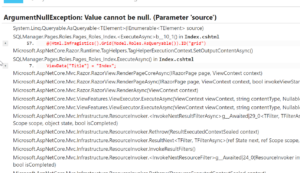
        A possible reason for this exception could be if jQuery is loaded more than once within the application. Please keep in mind that by design the template for a Razor pages project has references for jQuery scripts in the _Layout.cshtml file. What I could suggest is removing the following lines of code from the _Layout.cshtml in the “Shared” folder:

        <script src="~/lib/jquery/dist/jquery.min.js"></script>

        <script src="~/lib/bootstrap/dist/js/bootstrap.bundle.min.js"></script>

        <script src="~/js/site.js" asp-append-version="true"></script>


        After removing the scripts, the grid should be rendered and populated with data by using .DataBind().

        Additionally the system has rejected the project because of its size. If they are still problems with binding data to the grid, what I could suggest is uploading the project to a drive and sending me a link for the project.

        Regards,

        Monika Kirkova,

        Infragistics

      • 0
        Anitha Chellaperumal
        Anitha Chellaperumal answered on Aug 11, 2020 5:42 PM

        Hi Monika,

        Thank you. I created new .NET Core 3.1 project and removed all jQuery reference but still the grid is not visible on the page. you can see the page doesn’t have any layout reference to bootstrap or jquery. Is there anything I need to setup in the startup project?

        I use trial license is this something I need to check on. I am in the process of deciding to buy Infragistics so it’s important for me to understand it clearly. Thank you.

      • 0
        Monika Kirkova
        Monika Kirkova answered on Aug 12, 2020 2:20 PM

        Hello Anitha,

        The Infragistics.core, Infragistics.lob files and the Infragistics styles should also be referenced. They could be referenced in two ways:

        1. Using the cdn links.
        2. Locally in the project, in the Index.cshtml file or in the _Layout.cshtml

        If the files are referenced locally, the css and js folders from the Infragistics folder/2020.1/Ignite UI for jQuery should be included in the project and the following lines of code should be added in the _Layout.cshtml or Index.cshtml:

            <link rel="stylesheet" href="">stackpath.bootstrapcdn.com/…/bootstrap.min.css" integrity="sha384-JcKb8q3iqJ61gNV9KGb8thSsNjpSL0n8PARn9HuZOnIxN0hoP+VmmDGMN5t9UJ0Z" crossorigin="anonymous">

            <link href="~/css/structure/infragistics.css" rel="stylesheet" />

            <link href="~/css/themes/infragistics/infragistics.theme.css" rel="stylesheet" />


            <script src="">ajax.aspnetcdn.com/…/script>

            <script src="">code.jquery.com/…/script>

            <script src="">code.jquery.com/…/script>


            <script src="~/js/infragistics.core.js"></script>

            <script src="~/js/infragistics.lob.js"></script>

        More information regarding adding required resources could be found in the following topic.

        Furthermore, in the following link I have attached the sample project with all the files, demonstrating the use of igGrid with data binding and the referenced scripts.

        Please let me know if you need any further information regarding this matter.

        Regards,

        Monika Kirkova,

        Infragistics

  • You must be logged in to reply to this topic.
Discussion created by
Favorites
Replies
Created On
Last Post
Discussion created by
Anitha Chellaperumal
Favorites
0
Replies
11
Created On
Aug 12, 2020
Last Post
5 years, 6 months ago

Suggested Discussions

Created on

Aug 12, 2020 2:20 PM

Last activity on

Feb 23, 2026 3:27 PM