Skip to content

Infragistics Community Forum / Web / Ignite UI for Angular / How to add tooltip to show/hide column button

How to add tooltip to show/hide column button

New Discussion
Minakshi Mitra Kundu
Minakshi Mitra Kundu asked on Feb 10, 2021 3:56 PM

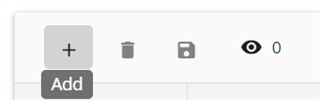
I want to add tooltip to show/hide column button.

I have added this piece of code to show the title on hover but cannot change the style of the title.

this.grid.toolbar.columnHidingButton.element.nativeElement.title = ‘Show Column’;

But I want the tooltip to look exactly as it is shown in the below image.
Sign In to post a reply

Replies

  • 0
    Tihomir Tonev
    Tihomir Tonev answered on Feb 8, 2021 2:28 PM

    Hello Minakshi,

    Thank you for posting on our forums.

    I would suggest removing the button title, and using our IgxTooltip component if you are looking to add custom tooltip to an element:

    Show/Hide
    Title

    More information on igxTooltip can be found on our website here:

    http://www.infragistics.com/…/tooltip

    Sincerely,
    Tihomir Tonev
    Associate Software Developer
    Infragistics

    • 0
      Minakshi Mitra Kundu
      Minakshi Mitra Kundu answered on Feb 8, 2021 6:47 PM

      Yes, I know how to add tooltip to buttons and already applied in my code. As, I am enabling show/hide by

       <igx-grid #inGrid [data]="inRecords" 
                      [autoGenerate]="false" 
                      displayDensity="comfortable" 
                      width="100%"
                      [paging]="false"
                      [allowFiltering]="false"
                      [showToolbar]="true"
                      [columnHiding]="true"
                      columnHidingTitle="Column Hiding">
      so not sure how to add tooltip here.
      • 0
        Tihomir Tonev
        Tihomir Tonev answered on Feb 9, 2021 1:18 PM

        Hello,

        There have been breaking changes for the toolbar since the release of Angular 11, so I suppose you are not using our latest version as well. More information about the latest changes can be read on our website here:

        https://www.infragistics.com/community/blogs/b/infragistics/posts/ignite-ui-for-angular-11-0-0-release

        Could you please let me know what version of IgniteUI and Angular are you using.

        Looking forward to your reply.

        Sincerely,
        Tihomir Tonev
        Associate Software Developer
        Infragistics

      • 0
        Minakshi Mitra Kundu
        Minakshi Mitra Kundu answered on Feb 9, 2021 1:56 PM

        I am using an older version i.e. Angular 8. So I could not apply the changes you have suggested.

        I am curious to know, how the tooltip for columnHiding was taken care in older version like Angular 8.

      • 0
        Tihomir Tonev
        Tihomir Tonev answered on Feb 9, 2021 3:28 PM

        Hello,

        The issue with older versions is that the toolbar was not really exposed, so what you would need to do is, re-template the toolbar from scratch. 


        This means you will have to put custom content there, including a button, which will be the columnHidingButton. Then you'd need to handle the click event of that button, and use the IgxToggle and IgxOverlay directives to display the content on the proper position. More information about that here.

        And finally, you can see from here how to host the columnHidingUI in a container, which will be the pop up.

        Please note that this is all now refactored and changed, so it will not be receiving any future updates. I would recommend updating to our latest version of IgniteUI if you are looking for improvements in this area.

        Sincerely,
        Tihomir Tonev
        Associate Software Developer
        Infragistics

      • 0
        Minakshi Mitra Kundu
        Minakshi Mitra Kundu answered on Feb 9, 2021 4:13 PM

        I will try out this and let u know.

      • 0
        Tihomir Tonev
        Tihomir Tonev answered on Feb 10, 2021 3:56 PM

        Hello,

        Should you need further help, please let me know.

        Thank you for using Infragistics components.

        Sincerely,
        Tihomir Tonev
        Associate Software Developer
        Infragistics

  • You must be logged in to reply to this topic.
Discussion created by
Favorites
Replies
Created On
Last Post
Discussion created by
Minakshi Mitra Kundu
Favorites
0
Replies
7
Created On
Feb 10, 2021
Last Post
5 years ago

Suggested Discussions

Created on

Feb 10, 2021 3:56 PM

Last activity on

Feb 19, 2026 8:13 AM