Uncaught ReferenceError: $ is not defined … (on $('#igGrid').igGrid ) — newbie question
New Discussion
My first day with Infragistics. Trying to use a grid in ASP MVC:
IN THE CONTROLLER, THIS:
[ChildActionOnly]
public ActionResult Detail2Grid()
{
var listeProduitCommande = from s in db.produitCommandes.Include(p => p.commande).Include(p => p.fournisseur)
where s.actif == true &&
s.noCommande == CommandeUI
select s;
return PartialView(listeProduitCommande);
}
ALONG WITH THIS IN THE VIEW:
<div>
@{Html.RenderAction(“Detail2Grid”, “commandes”);}
</div>
ALONG WITH THIS in Detail2Grid.cshtml:
@using Infragistics.Web.Mvc;
@model IQueryable<SPCP.Models.produitCommande>
<h2>Items List</h2>
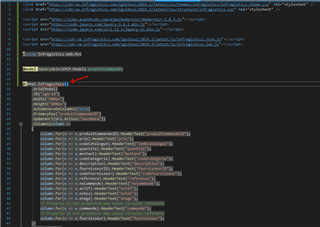
@(Html.Infragistics()
.Grid(Model)
.ID(“igGrid”)
.Width(“600px”)
.Height(“600px”)
.AutoGenerateColumns(false)
.PrimaryKey(“produitCommandeID”)
.UpdateUrl(Url.Action(“SaveData”))
.Columns(column =>
{
column.For(x => x.produitCommandeID).HeaderText(“produitCommandeID”);
column.For(x => x.prix).HeaderText(“prix”);
column.For(x => x.codeCatalogue).HeaderText(“codeCatalogue”);
column.For(x => x.quantite).HeaderText(“quantite”);
column.For(x => x.montant).HeaderText(“montant”);
column.For(x => x.codeCategorie).HeaderText(“codeCategorie”);
column.For(x => x.description).HeaderText(“description”);
column.For(x => x.fournisseurID).HeaderText(“fournisseurID”);
column.For(x => x.codeFournisseur).HeaderText(“codeFournisseur”);
column.For(x => x.reference).HeaderText(“reference”);
column.For(x => x.noCommande).HeaderText(“noCommande”);
column.For(x => x.actif).HeaderText(“actif”);
column.For(x => x.notes).HeaderText(“notes”);
column.For(x => x.etage).HeaderText(“etage”);
// Property is not primitive may cause circular reference
column.For(x => x.commande).HeaderText(“commande”);
// Property is not primitive may cause circular reference
column.For(x => x.fournisseur).HeaderText(“fournisseur”);
})
.Features(f =>
{
f.Selection()
.Mode(SelectionMode.Row);
f.Updating()
.EnableAddRow(true)
.EnableDeleteRow(true)
.EditMode(GridEditMode.Row);
})
.DataBind()
.Render())
GENERATES THIS:
<div>
<h2>Items List</h2>
<table id=”igGrid”></table>
<script type=”text/javascript”>$(function () {$(‘#igGrid’).igGrid({ dataSource: {“Records”:[{“produitCommandeID”:9135,”prix”:61.2500,”codeCatalogue”:”10001″,”quantite”:2,”montant”:122.5000,”codeCategorie”:10,”description”:”10001-RUNNING MAN (MÉTAL)”,”fournisseurID”:16,”codeFournisseur”:”RMSOWH-UDC”,”reference”:”1 unité”,”noCommande”:1379,”actif”:true,”notes”:”1 unité X la quantité”,”etage”:”Aucun”}],”TotalRecordsCount”:0,”Metadata”:{“timezoneOffset”:-14400000.0}},……… });});</script>
</div>
WHERE I GET THIS:
1379:236 Uncaught ReferenceError: $ is not defined
… (on $(‘#igGrid’).igGrid )
WHAT AM I MISSING?
Replies



- You must be logged in to reply to this topic.
 Francois Mongeau


