Add button inside webdatagrid columns from code behind
New Discussion
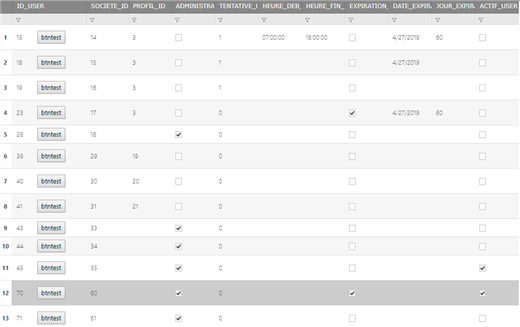
Hi , how can i add a button inside webdatagrid column from code behind ?
Sign In
to post a reply
Replies

- You must be logged in to reply to this topic.
Discussion created by
Favorites
Replies
Created On
Last Post
Discussion created by
 achraf gharbi
Favorites
0 Replies
3 Created On
May 14, 2019 Last Post
7 years, 5 months ago Suggested Discussions
DISCUSSION
VIEWS
REPLIES
LAST POST
Cancel the button click event from code behind
I am trying to figure out how to cancel the click event from code behind as I don't want my pag…

VIEWS
121,205
REPLIES
3
LAST POST
10 years, 11 months ago WebHierarchicalDataGrid samples using datasets/datatables from code-behind
How many levels of nested data could be displayed using WebHierarchicalDataGrid? We need to display…


VIEWS
217,444
REPLIES
41
LAST POST
7 years, 5 months ago Changing the Column Width from code behind
Hi, I have a requirement where I need to set the width of a column to "Auto". I am able t…

VIEWS
107,702
REPLIES
5
LAST POST
10 years ago Adding bands and colums to WebHierarchicalDataGrid with behind code
Hello How to add bands and colums to WebHierarchicalDataGrid from DataSet using C#. I have to…


VIEWS
131,710
REPLIES
8
LAST POST
14 years, 10 months ago 