Skip to content

Infragistics Community Forum / Desktop / Ultimate UI for WPF / XamPivotGrid FlatDataSource Sorting Rows and Columns

XamPivotGrid FlatDataSource Sorting Rows and Columns

New Discussion
Tobias Krasinger
Tobias Krasinger asked on Oct 15, 2026 7:59 AM

I have a dataSource with ProjectData and I created a FlatDataSource with the following code:

dataSource = new FlatDataSource()
{
    ItemsSource = data,
    Cube = DataSourceBase.GenerateInitialCube(viewMode),
    Rows = DataSourceBase.GenerateInitialItems($"[{nameof(ProjectData.Project)}].[{nameof(ProjectData.Project)}]"),
    Columns = DataSourceBase.GenerateInitialItems($"[{nameof(ProjectData.VNSprint)}].[{nameof(ProjectData.VNSprint)}]"),
    Measures = DataSourceBase.GenerateInitialItems(nameof(ProjectData.Duration))
};
return dataSource;

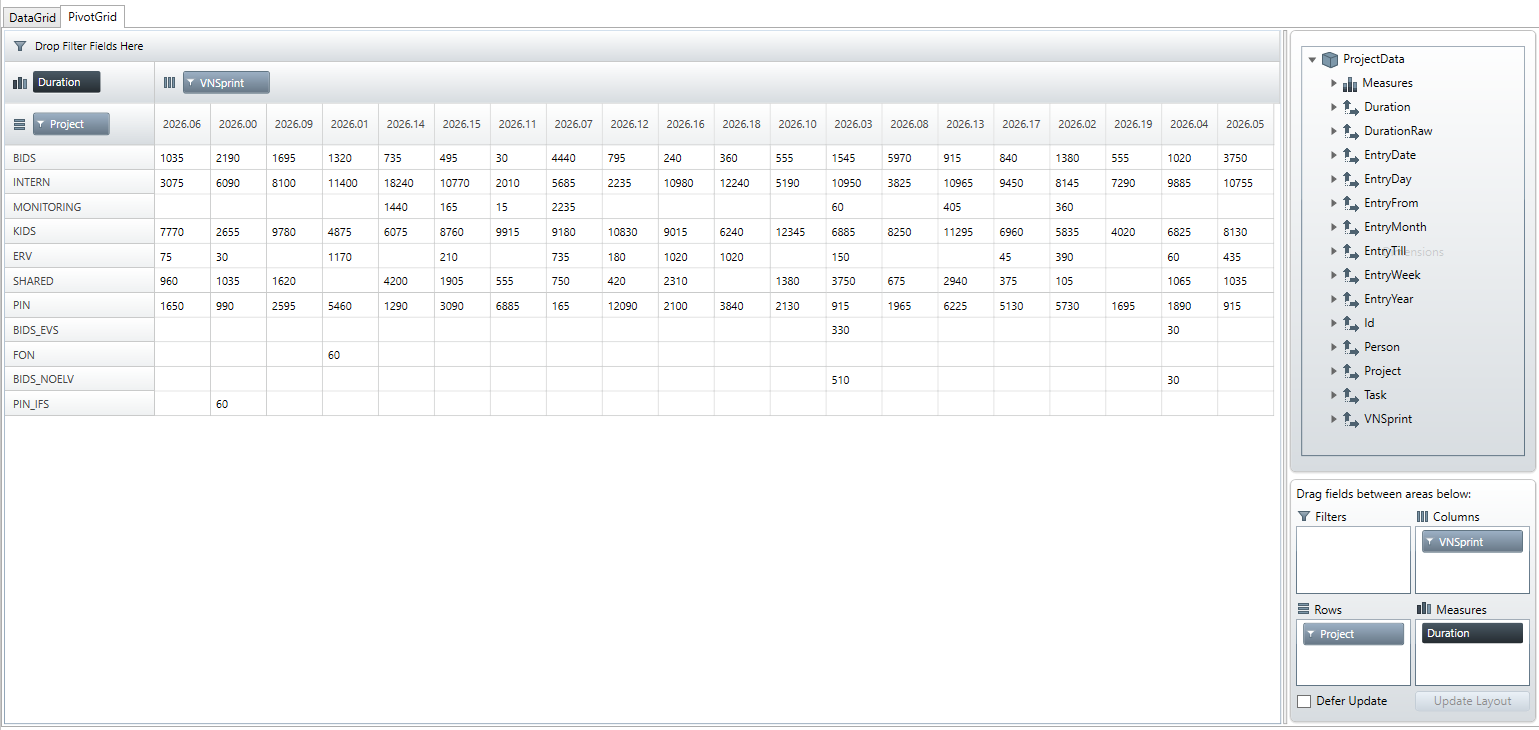
but the output does not sort the columns or rows itsself. How can I set the order of rows and columns to that the columns (column-headers) are in the correct order: so columns should be ordered liked: 2026.01, 2026.02, 2026.03, etc.
rows should be ordered alphabeticly.

I want to enforce the sorting by code – but also with the given UI, its not possible to sort the data. I dragged the “project” field into “rows” but the row order is very random. How can I, as user of the UI, sort the rows by projectnames?

Sign In to post a reply

Replies

  • 0
    Tobias Krasinger
    Tobias Krasinger answered on Oct 15, 2026 11:39 AM

    Also I can’t find any documentation on how to add summaries for the columns.

  • 0
    Andrew Goldenbaum
    Andrew Goldenbaum answered on Oct 15, 2026 3:34 PM

    Hello Tobias,

    In order to sort the rows and columns of the XamPivotGrid, I would recommend taking a look at the following documentation: https://www.infragistics.com/help/wpf/xampivotgrid-sorting-rows-and-columns.

    The above topic goes over how to define HierarchyDescriptors for your FlatDataSource in order to sort the different hierarchies in the grid. Additionally, if you are looking to be able to simply sort the data/measures of the grid at runtime, I would recommend checking out this topic as well: https://www.infragistics.com/help/wpf/xampivotgrid-us-sorting-data.

    Please let me know if you have any other questions or concerns on this matter.

    Sincerely,
    Andrew Goldenbaum
    Software Developer
    Infragistics

  • 0
    Tobias Krasinger
    Tobias Krasinger answered on Oct 16, 2026 9:17 AM

    Hi Andrew,

    so like the documentation states, I added the following code, with the following outcome:

    var sprintHierarchy = new HierarchyDescriptor<ProjectData>(p => p.VNSprint);
    sprintHierarchy.AddLevel(p => "All Sprints", "All Sprints");
    sprintHierarchy.AddLevel(p => p.VNSprint, "Sprints");
    
    Expression<Func<ProjectData, string>> vnSprintSort = projectData => projectData.VNSprint;
    sprintHierarchy.LevelDescriptors[0].OrderByKeyExpression = vnSprintSort;
    sprintHierarchy.LevelDescriptors[1].OrderByKeyExpression = vnSprintSort;
    
    var projectHierarchy = new HierarchyDescriptor<ProjectData>(p => p.Project);
    projectHierarchy.AddLevel(p => "All Projects", "All Projects");
    projectHierarchy.AddLevel(p => p.Project, "Project");
    
    Expression<Func<ProjectData, string>> projectSort = projectData => projectData.Project;
    projectHierarchy.LevelDescriptors[0].OrderByKeyExpression = projectSort;
    projectHierarchy.LevelDescriptors[1].OrderByKeyExpression = projectSort;
    
    dataSource.AddHierarchyDescriptor(sprintHierarchy);
    dataSource.AddHierarchyDescriptor(projectHierarchy);


    Result:

    I now have totals on the far right and on the bottom, but the sort expression doesn’t sort the columns or the rows the right way.
    But even than, that would mean, that I would have to add an orderByExpression for every possible field.

  • 0
    Tobias Krasinger
    Tobias Krasinger answered on Oct 16, 2026 9:21 AM

    I tried changing the sort of projects from projectData => projectData.Project to projectData => projectData.Project.Length and during debugging I  noticed that the expression is called for every project in the list, but the ordering of the projects is still not applied correctly.

  • You must be logged in to reply to this topic.
Discussion created by
Favorites
Replies
Created On
Last Post
Discussion created by
Tobias Krasinger
Favorites
0
Replies
4
Created On
Oct 15, 2026
Last Post
3 hours, 43 minutes ago

Suggested Discussions

Tags

No tags

Created by

Created on

Oct 15, 2026 7:59 AM

Last activity on

Oct 15, 2026 7:59 AM