
Replies

Let's try again to see what is the problem.. I did the following, got the same result :
C:\_ng>npm i -g @igniteui/angular-schematics
> @igniteui/angular-schematics@12.0.803 preuninstall C:\Users\gkheysin\AppData\Roaming\npm\node_modules\@igniteui\angular-schematics
> node ./scripts/uninstall.js
> @igniteui/angular-schematics@12.0.803 postinstall C:\Users\gkheysin\AppData\Roaming\npm\node_modules\@igniteui\angular-schematics
> node ./scripts/install.js
+ @igniteui/angular-schematics@12.0.803
updated 1 package in 20.252s
C:\_ng>cd new_ig1
C:\_ng\new_ig1>ng new –collection="@igniteui/angular-schematics"
An unhandled exception occurred: Collection "@igniteui/angular-schematics" cannot be resolved.
See "C:\Users\gkheysin\AppData\Local\Temp\1\ng-LsQndG\angular-errors.log" for further details.
then I've run
C:\_ng\new_ig1>npm config get prefix
C:\Users\gkheysin\AppData\Roaming\npm
and check the contents, there is no \@angular-devkit.
It seems that I do trying to install @igniteui/angular-schematics globally.. do you see anything wrong with the sequence or what else could be a potential source of the problem?
I also did search through the whole c: drive for node-module-engine-host.js
It is located in the following global folder for npm :
C:\Users\gkheysin\AppData\Roaming\npm\node_modules\@igniteui\angular-schematics\node_modules\@angular-devkit\schematics\tools
Could it be that folder structure is the reason for error ?

Still, what could be potential reasons for the angular schematics giving the error while it was installed.
If there are ways to check the settings.. the log file not very helpful.
[error] Error: Collection "@igniteui/angular-schematics" cannot be resolved
Thanks
Hello,
Thanks a lot for detailed answer.. I'll be using hierarchical grid, as the structure of my child grids not only different from the parent records it also different between themselves, so different parent records will have up to five different type of child records…
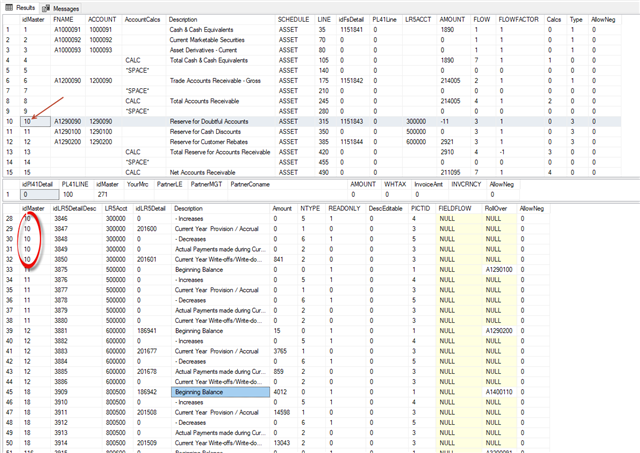
To that end I would like to ask question regarding binding.. this is not to ask for all the details and/or 'how' but rather if there is a way. On the sample I've seen binding done by from JSON object having child structures right after each parent record.. Is there a way to bind data to the grid different way, such as having multiple JSON objects ( Six in my case – One parent records and 5 with child records ) and having it works through having foreign keys in child data linked to primary key in parent data set.. as sample below.. so in that data schema, for example, the parent record with idMaster = 10 will have 5 child records etc. and parent records that do not have child records won't have expand/collapse indicator..
Thanks.

Thanks for showing how to change label.. regarding issue #2 attached sample .. when you open dialog window and move mouse inside without pressing, it will show what is in the dialog title in the tool tip all over the dialog window.. in this case it will be "Tool Tip: Just wonder if it is possible to remove it. Thanks.ng5_2D00_ig_2D00_dia_2D00_up_5F00_modified.zip
then clock –> then click
Can you shoe how –> Can you show how
Hi Divya Jain,
The solution has some issues – If you choose that row and then clock the hidden checkbox, it does pops up again and you can click it and change value,
Can you resolve this and also I need this check box hidden on the bottom grid but actually disabled on the top grid. Can you shoe how it can be done ( Both hide on the bottom grid and disable on the top grid)
Thanks