Skip to content

Infragistics Community Forum / Web / Ignite UI for Blazor / Nullable DateTime in grid column

Nullable DateTime in grid column

New Discussion
Walter Enzor
Walter Enzor asked on Aug 6, 2021 6:25 PM

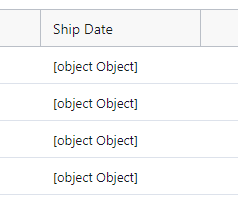
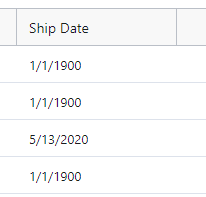
When I attempt to bind a grid column to a nullable DateTime field in my class, my column displays [object.Object] in the column.  This is displayed for all rows regardless of whether they are null or not.  If I change the property to a non-nullable column, I get the date values and my replacement value for a nullable date, but I would prefer to have the column blank rather than populating my object with a really old date value like I did below to narrow the issue down.  Is there a way to accomplish this?  Thanks!

Class property:
public DateTime? ShipDate { get; set; }

Column definition:
<DateTimeColumn Width=”@(“*>160″)” Field=”ShipDate” HeaderText=”Ship Date” />

Column result (regardless of null value or not):
Change property (only change made.  Records with 1/1/1900 would normally be null values but I replaced null with 1/1/1900 when populating my objects):
public DateTime ShipDate { get; set; }
Sign In to post a reply

Replies

  • 0
    Andrew Goldenbaum
    Andrew Goldenbaum answered on Aug 5, 2021 3:21 PM

    Hello Walter,

    At the time of writing this, the Ignite UI for Blazor DataGrid does not currently support nullable types, and so unfortunately, the DateTime? type in this case is not supported at the moment. The grid at the moment does not know how to convert the nullable types internally and so it displays them as the [object Object] that you are currently seeing.

    This is a current limitation of the control, and it is known. We are looking to have support for nullable types in a future version of the DataGrid control. For the time being though, the best recommendation I have for you is to utilize the DateTime type and use DateTime.MinValue for the pieces that you are looking to be null.

    Please let me know if you have any other questions or concerns on this matter.

    • 0
      Walter Enzor
      Walter Enzor answered on Aug 6, 2021 2:40 PM

      Thanks for your reply.  Can you point me to an example of how to use the MinValue in the way you recommend?  I looked around and I can't find anything that seems to apply. 

      • 0
        Andrew Goldenbaum
        Andrew Goldenbaum answered on Aug 6, 2021 5:42 PM

        Hello Walter,

        I am attaching a sample project that demonstrates usage of the DateTime.MinValue in the Ignite UI for Blazor DataGrid. The cells with the value of DateTime.MinValue will appear blank as if they were null.

        I hope this helps. Please let me know if you have any other questions or concerns on this matter.

        BlazorMinDateDemo

      • 0
        Walter Enzor
        Walter Enzor answered on Aug 6, 2021 6:25 PM

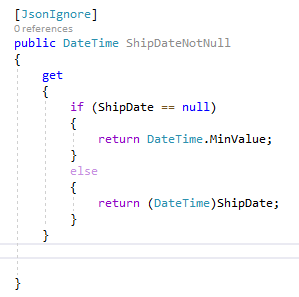
        Ah, I didn’t realize leaving it blank for the MinValue was the default behavior.  I added the property below to my presentation model, rebound the column to it and I was done.  Great!  Thanks for the example.

  • You must be logged in to reply to this topic.
Discussion created by
Favorites
Replies
Created On
Last Post
Discussion created by
Walter Enzor
Favorites
0
Replies
4
Created On
Aug 06, 2021
Last Post
4 years, 8 months ago

Suggested Discussions

Created by

Created on

Aug 6, 2021 6:25 PM

Last activity on

Feb 23, 2026 10:40 AM