
Replies

Hello Andrew,
thanks for your investigation.
I tried it at an other PC, and yes, this was working!
Back at my machine i cleaned up everything, even temp-files, etc.
Nothing changed, still crashing.
After this i tried to start the visual studio in admin-mode – AND IT WORKED!
I don't know why, but this is the solution i need to go on – starting Visual Studio in Admin-Mode…
Thx again, stay save and have a nice time.
Greets from Austria,
Mike
In the ZIP-File of the first post you got the following file:frm_Artikel.vbfrm_Artikel.Designer.vb
maybe you need this file too: frm_Artikel.resx
Attachments:
by the way – in run time it works fine!
Hi Mike,
thanks for your help, that was exactly what i was looking for! Great!
Greets,
Mike
Hi Mike,
thanks for your answer.
You're right, if the UltraComboEditor is used as standalone control.
I would like to use it as EditorComponent in an UltraGrid.
I have created a simple, quick and dirty Test-Application for that:
Public Class clsItem
    Public Property nItemID As Integer
    Public Property sItemName As String
    Public Property sDescription As String
    Public Property lstOwner As New List(Of clsUser)
End Class


Public Class clsUser
    Public Property nUserID As Integer
    Public Property nUserName As String
End Class


Public Class Form1

    Dim lstItems As New List(Of clsItem)
    Dim lstUsers As New List(Of clsUser)

    Private Sub Form1_Load(sender As Object, e As EventArgs) Handles MyBase.Load

        'Create DEMO-Data
        For i As Integer = 1 To 10
            Dim cItem As New clsItem
            cItem.nItemID = i
            cItem.sItemName = "Item " & i
            lstItems.Add(cItem)

            Dim cUser As New clsUser
            cUser.nUserID = i
            cUser.nUserName = "User " & i
            lstUsers.Add(cUser)
        Next

        'Settings UltraComboEditor
        UltraComboEditor1.DataSource = lstUsers
        UltraComboEditor1.ValueList.DisplayStyle = Infragistics.Win.ValueListDisplayStyle.DisplayText
        UltraComboEditor1.DisplayMember = "nUserName"
        UltraComboEditor1.ValueMember = "nUserID"

        'Settings UltraGrid
        UltraGrid1.DataSource = lstItems
        For Each col As Infragistics.Win.UltraWinGrid.UltraGridColumn In UltraGrid1.DisplayLayout.Bands(0).Columns
            Select Case col.Key
                Case "lstOwner"
                    col.CellAppearance.TextHAlign = Infragistics.Win.HAlign.Left
                    col.EditorComponent = UltraComboEditor1
            End Select
        Next

    End Sub

    Private Sub UltraButton1_Click(sender As Object, e As EventArgs) Handles UltraButton1.Click
        Debug.Print(Me.UltraComboEditor1.Value)
    End Sub
End Class
If i use the property clsItem.lstOwner as List(Of clsUser) it will not be displayed in the UltraGrid:

When i change the property clsItem.lstOwner as String the Column is displayed.
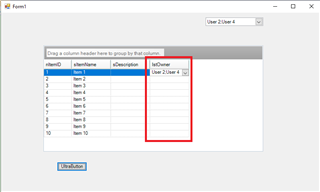
Now i get the Data-Types as Result:
Me.UltraComboEditor1.Value: Type is List(Of Object)
Me.UltraGrid1.Rows(0).Cells("lstOwner").Value: Type is String ("User2;User4")
Greets,
Mike
Hi Michael,
i don't think that this is something new or anything who nobody needs.
I just wand to bind a key/value-list.
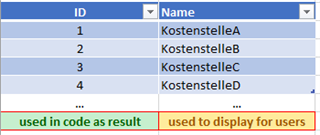
The EditorComponent can handle this with a single-selection.
Therefore you use the "DisplayMember" and "ValueMember".
Only if you want to use multi-selection this issue occurs.
I think, this should be a default function ….
Greets,
Mike
Hi Michael,
thx for your answer, but i am sorry, thats not the resolution.
Setting the DisplayStyle to "DataValue" means, that the user sees the values, too.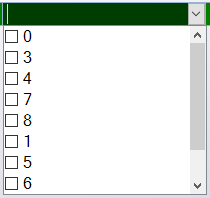
I need the (Display)Text for the user and the (Data)Value for the code.
Greets,
Mike