
Replies

Hi,
Thanks for your quick response. I tried the below code from the help topic , But still sorting is not working for me
This is my Page load code I am adding after binding data into the grid
this.WebHierarchicalDataGrid.RowIslandDataBinding += new RowIslandEventHandler(WebHierarchicalDataGrid_RowIslandDataBinding); in page load.
WebHierarchicalDataGrid is my grid ID,
protected void Page_Load(object sender, EventArgs e)
{
MessageControl.HideMessage();
if (!IsPostBack)
{
this.WebHierarchicalDataGrid.Columns.Clear(true);
BindToGrid();
this.WebHierarchicalDataGrid.RowIslandDataBinding += new RowIslandEventHandler(WebHierarchicalDataGrid_RowIslandDataBinding);
}
if (IsPostBack)
{
this.WebHierarchicalDataGrid.EnsureTemplates();
}
}
After initializing the RowsIslandDataBinding event , I am creating the event method
void WebHierarchicalDataGrid_RowIslandDataBinding(object sender, RowIslandEventArgs e)
{
// Sort a Column in PARENT BAND
if (e.RowIsland.DataMember == "SqlDataSource1_DefaultView")
{
Sorting sort = e.RowIsland.Behaviors.Sorting;
sort.SortedColumns.Add("vchMainSection", Infragistics.Web.UI.SortDirection.Ascending);
}
// Sort a Column in CHILD BAND
if (e.RowIsland.DataMember == "SqlDataSource2_DefaultView"
&& e.RowIsland.ParentRow == this.WebHierarchicalDataGrid.GridView.Rows[1])
{
Sorting sort = e.RowIsland.Behaviors.Sorting;
sort.SortedColumns.Add(e.RowIsland.Columns[2], Infragistics.Web.UI.SortDirection.Ascending);
}
}
Still Sorting is not working.
ScreenShot of my Grid

Red highlighted one vchSubsection as per my requirement 1. Trip Objective should come first.
I tried to sort by iSectionID which identity is column(1,2,3..). But it was not working ,then I have appended 1 and 2 before each vchSubSection column to sort in ascending order in the grid.That one also not sorting properly.
Below one is screenshot of my Dataset to bind Grid
I am doing grouping by Column[1].ie, vchMainSection after grouping I am trying to do sorting by
Column[2] .ie, vchSubSection
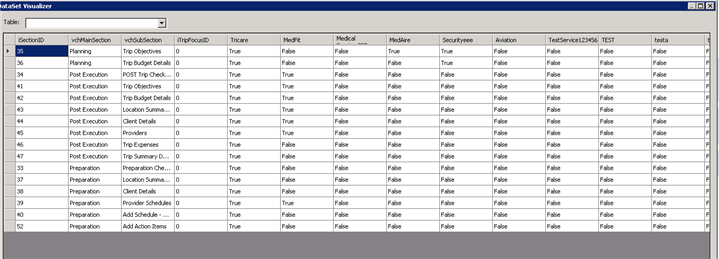
I am using infragistics assembly version –> Assembly="Infragistics45.Web.v16.2, Version=16.2.20162.2013, Culture=neutral, PublicKeyToken=7dd5c3163f2cd0cb"
Please help out how to do sorting after grouping by vchMainSection Column.
I have do sorting by sub section marked in red first screenshot or another other option also fine for me to achieve sorting.
Please also suggest me if any other options.
I am waiting for your help.
Thanks
Thanks for reply.Its working fine.
I have some issue related to Sorting WebHierarchicalDataGrid .. Below is my code where I am binding dynamically generated columns to WebHierarchicalDataGrid .
WebHierarchicalDataGrid.DataSource = ds;
GenerateBoundFieldColumn();
GenerateTemplatedColumn(xmlConfigSection, dtBindConfig, isSaved);
this.WebHierarchicalDataGrid.GroupingSettings.GroupedColumns.Add("vchMainSection");
this.WebHierarchicalDataGrid.GroupingSettings.GroupAreaVisibility = Infragistics.Web.UI.GridControls.Visibility.Hidden;
WebHierarchicalDataGrid.DataBind();
The below code I am dynamically creating BoundField
public void GenerateBoundFieldColumn()
{
BoundDataField boundField = new BoundDataField();
boundField.Key = "vchMainSection";
boundField.Header.Text = "Section Name";
boundField.Width = Unit.Percentage(18);
BoundDataField boundFieldSubSection = new BoundDataField();
boundFieldSubSection.Key = "vchSubSection";
boundFieldSubSection.Header.Text = "Section Name";
boundField.Width = Unit.Percentage(18);
boundField.Hidden = true;
BoundDataField boundFieldSectionID = new BoundDataField();
boundFieldSectionID.Key = "iSectionID";
boundFieldSectionID.Header.Text = "";
boundFieldSectionID.Hidden = true;
boundField.Width = Unit.Percentage(0);
boundField.CssClass = "clmDisabled";
this.WebHierarchicalDataGrid.Columns.Add(boundField);
this.WebHierarchicalDataGrid.Columns.Add(boundFieldSubSection);
this.WebHierarchicalDataGrid.Columns.Add(boundFieldSectionID);
}
My issue is, I want to sort by specific integer column (iSectionID) which is already hidden.
I want override Groupsettings order by. I want to default sorting based on iSectionID.
Please help me out how to do sorting after grouping or suggest me the possible way to customize based on specific integer column.
{
int count = 0;
foreach(var col in dtBindConfig.Columns)
{
if (count > 3)
{
string colName = Regex.Replace(col.ToString(), @"\s+", "");//removing spaces from the TempColumns
templateCol.Key = colName.ToString();
templateCol.Header.Text = colName.ToString();
templateCol.Width = Unit.Percentage(8);
templateCol.ItemTemplate = new CustomItemTemplate();
this.WebHierarchicalDataGrid.Columns.Add(templateCol);
}
count = count + 1;
}
}
{
public void InstantiateIn(Control container)
{
string columnKey = (((GridRecordItem)(((TemplateContainer)container).Item)).Column).Key;
CheckBox checkbox = new CheckBox();
checkbox.ID = "chk" + spaceFreeColumnKey;
checkbox.Checked = (bool)DataBinder.Eval(((TemplateContainer)container).DataItem, spaceFreeColumnKey);
container.Controls.Add(checkbox);
}
}
private int UpdateCheckBoxValuetoDatabase(WebHierarchicalDataGrid grdCtrl)
{
foreach (GridRecord row in grdCtrl.Rows)
{
List<TemplateColumn> TempColumn =GetDynamicTemplateColumns(); //Getting all dynamic check box columns will returns all checkbox column names
int cnt = 0;
foreach (var columnName in TempColumn)
{
string tripfocus = Regex.Replace(tripFocus.vchTripFocusName, @"\s+", "");
string ID = "chk" + columnName;
string templateName = columnName;
CheckBox chkTripFocus = UIHelper.GetWebGridControl(row, ID, templateName) as CheckBox;//this method to find the checkbox by Template key and CheckBoxID but here returns null
if (chkTripFocus.Checked)
{
bActive = true;
}
configureSection.vchTripFocusName = tripFocus.vchTripFocusName;
configureSection.iSectionID = SectionId;
configureSection.bActive = bActive;
// ntmClient.UpdateTripSectionMapped(configureSection);
}
{
if (templateName != null)
return row.Items.FindItemByKey(templateName).FindControl(cntName);
else
return row.Items.FindItemByKey(cntName).Value;
}
Hi,
Thanks for you swift response.The Sample which you have shared been working fine.
But I have another issue while getting the checkbox control or
how to get checkbox control and check whether it has checked or not. I am getting object reference error while getting checkbox control.
Please find below code which I have tried to get control but checkbox returning null.
public static object GetWebGridControl(Infragistics.Web.UI.GridControls.GridRecord row, string cntName, string templateName = null)
        {
            if (templateName != null)
                return row.Items.FindItemByKey(templateName).FindControl(cntName);
            else
                return row.Items.FindItemByKey(cntName).Value;
        }

        //I am passing row and controlid,template key)

        CheckBox cpFocus = UIHelper.GetWebGridControl(row, "chk-" + tripFocus.vchTripFocusName, null) as CheckBox;
"CpFocus" returning null. Because it is not getting control.
sample html code for one dynamic checkbox I got from view source of the grid page
<input name="ctl00$ctl00$ctl00$TopHeader$MainMenu$AdminPageContent$WebHierarchicalDataGrid$ctl00$it4_2$chk-MedFit"
id="ctl00_ctl00_ctl00_TopHeader_MainMenu_AdminPageContent_WebHierarchicalDataGrid_ctl00_it4_2_chk-MedTest"
type="checkbox" checked="checked">
Please assist me how to get the dynamic template check control code behind and I need to store it into database.
Thanks in Advance. Please help me out to resolve the issue ASAP.
Thanks