Replies

Hi Tsanna,
I worked around this by changing the value in the dataset before it reaches the grid.
Thanks,
Rick
Hi Tsanna,
My mistake, use are using "bootstrap" style in your example. However it shouldn't make a difference.
If you are able to get the sample you provided me running in IE11 you should see the problem.
Chrome seems to override the tag in css/structure/infragistics.css:
.ui-iggrid-modifiedrecord>td{font-style:italic}
with the tags in css/themes/bootstrap/infragistics.theme.css:
.ui-iggrid-modifiedrecord>td{-webkit-animation-name:addingHighlight;-webkit-animation-timing-function:ease-in-out;-webkit-animation-duration:1s;-moz-animation-name:addingHighlight;-moz-animation-timing-function:ease-in-out;-moz-animation-duration:1s;-o-animation-name:addingHighlight;-o-animation-timing-function:ease-in-out;-o-animation-duration:1s;animation-name:addingHighlight;animation-timing-function:ease-in-out;animation-duration:1s}
.ui-iggrid-modifiedrecord>td{background-color:transparent;color:#999}
In short, in IE11 you should see the italics applied (which illustrate the problem when the grid renders), so please use that for your testing.
Thanks!
Hi Tsanna,
That works great for the first two issues (Thanks!) however the last requirement still seems to be an issue. When I click “Apply Defaults to All” (in your sample) it does not “ignore” the Exempt rows but instead updates them like the rest.
A couple of other things…
1) the example you provided seems to only work in Chrome. In IE11 the grid never populates for some reason. It would help me to get it working in IE because that is our target development environment and it would help me diagnose some styling issues similar to that below.
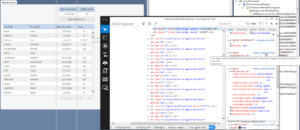
2) In your sample, when we are updating the score to display the “Exempt” value, the row appears normal. However in my development environment, when I introduce your code, when the grid is rendered it shows the text in the rows that were modified (via our rowRendered) in italics. The styleset that we are using is “infragistics”. In my environment when a row is edited and “Done” is clicked, it displays the row in italics. So it seems our “rowRendered” modification of the row is causing it to look to the user as if the row has been edited. This is undesirable as it indicates to the user that this row has been edited when in fact the user has (and could not) make any edits to these rows that we modified (vis rowRendered) to essentially be read-only. Again, your sample does not reproduce this behavior unfortunately which is confusing because you seem also to be using the “infragistics” style.
Please see the attached screenshot. You can see that the row we modified (vis rowRendered) appears italicized (indicated the row has been edited whereas we just want it to appear normally). Looking at the styles applied in the DOM it appears to have a “ui-iggrid-modifiedrecord” applied. Note the css file being used “IgniteUI/css/themes/infragistics/infragistics.theme.css” which should essentially be the same as yours (same “infragistics” style). You’ll note I have different colored headers etc. but this is because I added some minor css color tweaks in-line in the page (nothing that should effect the above).