

 Jason Beres
Choosing between a React Tree Grid vs Hierarchical Grid can impact performance, usability, and long-term maintainability.
The wrong choice often does not fail immediately. Instead, issues appear later when:
- Columns no longer fit the data
- Interactions become confusing
- Deep drill-down requires refactoring
So the real question is: Does each level represent the same data type, or different entities?
This guide explains:
- The difference between a React Tree Grid and a React Hierarchical Grid
- When to use each approach
- Code examples using Ignite UI for React
- Performance and scalability considerations
TL;DR
- Use a React Tree Grid for recursive data with the same structure across all levels
- Use a React Hierarchical Grid for relational data with different entities per level
- Tree Grid = single grid, better for large datasets
- Hierarchical Grid = nested grids, better for drill-down scenarios
React Tree Grid vs Hierarchical Grid: Quick Answer
A React Tree Grid is best for recursive data where each level shares the same structure.
A React Hierarchical Grid is best for relational data where each level represents a different entity.
- Use a Tree Grid for folders, categories, org charts, and portfolios
- Use a Hierarchical Grid for customer → order → line item or client → account → position
Rule of thumb: Same data structure = Tree Grid. Different data structures = Hierarchical Grid.
What Is a React Tree Grid?
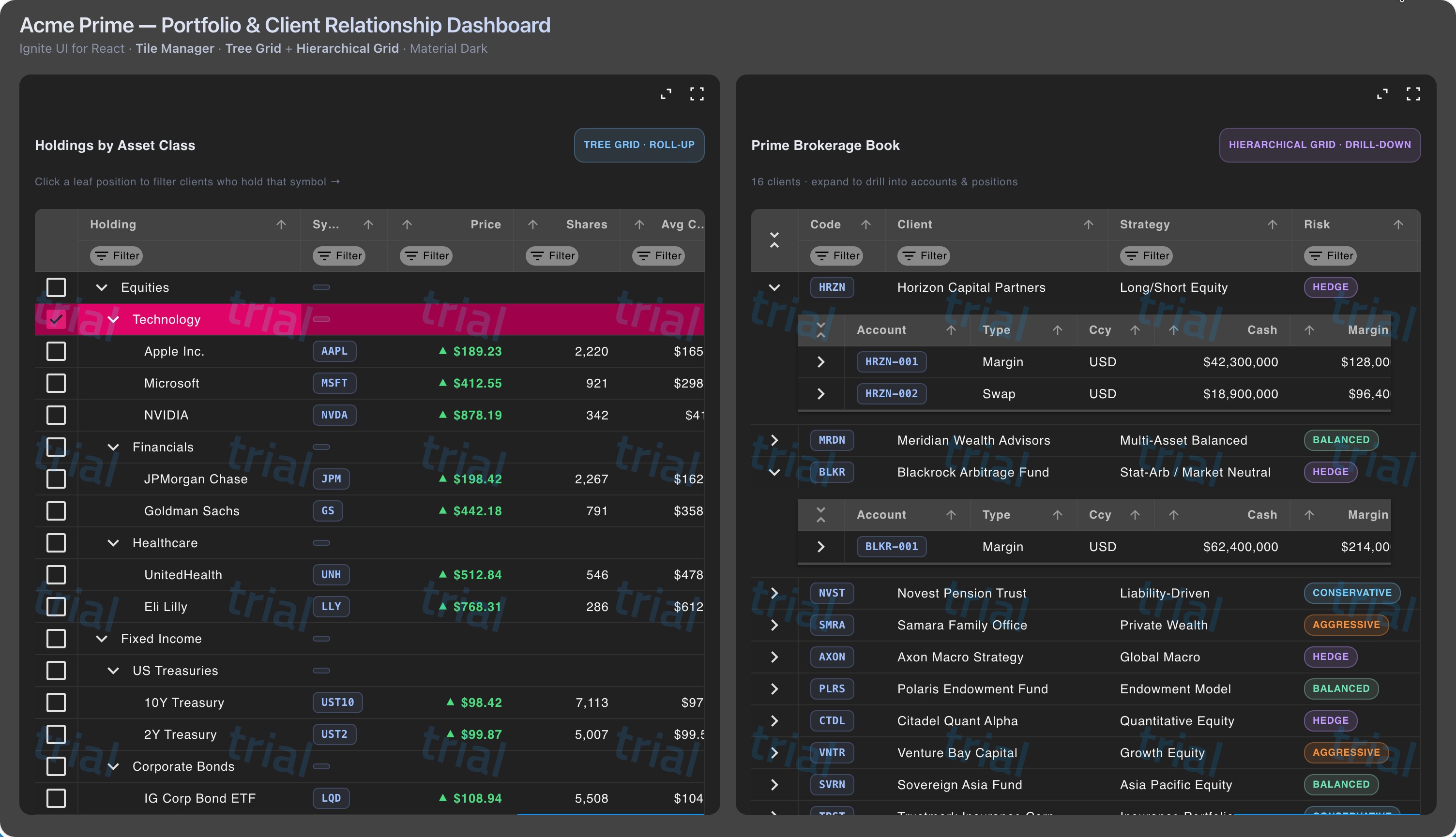
A React Tree Grid displays hierarchical data in a single grid using parent-child relationships. Each row can expand inline, and every level uses the same column schema.
Equities
├── Technology
│   ├── Apple
│   ├── Microsoft
│   └── NVIDIA
├── Financials
│   ├── JPMorgan
│   └── Goldman Sachs
└── Healthcare
    ├── UnitedHealth
    └── Eli Lilly
When to Use a React Tree Grid
- Your data is recursive
- Each level has the same structure
- You want a single, continuous grid view
- You need inline expand and collapse
React Tree Grid Example
import {
  IgrTreeGrid,
  IgrColumn
} from 'igniteui-react-grids';

const portfolio = [
  {
    id: 1,
    name: 'Equities',
    marketValue: 2400000,
    children: [
      {
        id: 2,
        name: 'Technology',
        marketValue: 1100000,
        children: [
          { id: 3, name: 'Apple', ticker: 'AAPL', marketValue: 420000 },
          { id: 4, name: 'Microsoft', ticker: 'MSFT', marketValue: 360000 }
        ]
      }
    ]
  }
];

export default function PortfolioTreeGrid() {
  return (
    <IgrTreeGrid
      data={portfolio}
      primaryKey="id"
      childDataKey="children"
      autoGenerate={false}
      rowSelection="single"
      allowFiltering={true}
    >
      <IgrColumn field="name" header="Name" sortable={true} />
      <IgrColumn field="ticker" header="Ticker" sortable={true} />
      <IgrColumn field="marketValue" header="Market Value" dataType="number" sortable={true} />
    </IgrTreeGrid>
  );
}
What Is a React Hierarchical Grid?
A React Hierarchical Grid displays related data using nested child grids. Each level represents a different entity and can have its own columns and configuration.
Client
└── Account
    └── Position
When to Use a React Hierarchical Grid
- Each level represents a different entity
- Each level requires different columns
- You need drill-down interactions
- You want independent configuration per level
React Hierarchical Grid Example
import {
  IgrHierarchicalGrid,
  IgrColumn,
  IgrRowIsland
} from 'igniteui-react-grids';

export default function BrokerageHierarchy({ clients }) {
  return (
    <IgrHierarchicalGrid
      data={clients}
      autoGenerate={false}
      primaryKey="clientId"
      rowSelection="single"
    >
      <IgrColumn field="clientCode" header="Client Code" />
      <IgrColumn field="clientName" header="Client Name" />
      <IgrColumn field="aum" header="AUM" dataType="number" />

      <IgrRowIsland key="accounts" autoGenerate={false} primaryKey="accountId">
        <IgrColumn field="accountNumber" header="Account" />
        <IgrColumn field="accountType" header="Type" />
        <IgrColumn field="cash" header="Cash" dataType="number" />

        <IgrRowIsland key="positions" autoGenerate={false} primaryKey="positionId">
          <IgrColumn field="symbol" header="Symbol" />
          <IgrColumn field="shares" header="Shares" dataType="number" />
          <IgrColumn field="price" header="Price" dataType="number" />
        </IgrRowIsland>
      </IgrRowIsland>
    </IgrHierarchicalGrid>
  );
}
React Tree Grid vs Hierarchical Grid: Key Differences
| Feature | React Tree Grid | React Hierarchical Grid |
|---|---|---|
| Data model | Recursive | Relational |
| Schema | Same across levels | Different per level |
| Rendering | Single grid | Nested grids |
| UX pattern | Continuous scanning | Drill-down |
| Component | IgrTreeGrid | IgrHierarchicalGrid |
Behavior Differences
Tree Grid Behavior
- Inline row expansion
- Shared columns across levels
- Hierarchical sorting
- Tree-aware filtering
Hierarchical Grid Behavior
- Nested grid expansion
- Independent columns per level
- Per-level sorting and filtering
- Separate data views
Performance and Scalability
Choosing between a React Tree Grid and Hierarchical Grid also affects performance.
- Tree Grid: better for large, uniform datasets (10K+ rows)
- Hierarchical Grid: heavier when many nested grids are expanded
Use:
- Tree Grid for large recursive datasets
- Hierarchical Grid for targeted drill-down scenarios
When to Use Each
Use a React Tree Grid when:
- Data is recursive
- Schema is consistent
- You need one grid view
Use a React Hierarchical Grid when:
- Data spans multiple entities
- Each level needs different columns
- Drill-down interaction is required
Decision Framework
- Is each level the same data type?
- If yes → use a React Tree Grid
- If no → do levels need different columns?
- If yes → use a React Hierarchical Grid
FAQ: React Tree Grid vs Hierarchical Grid
What is the difference between a Tree Grid and a Hierarchical Grid?
A React Tree Grid displays recursive data in one grid. A React Hierarchical Grid displays related entities using nested grids.
Which is better for large datasets?
A Tree Grid is typically more efficient. A Hierarchical Grid is better for structured drill-down.
Can both be used in the same React app?
Yes. Many applications use both depending on the data view.
Final Takeaway
When comparing a React Tree Grid vs Hierarchical Grid, start with your data model.
- Recursive structure → use a React Tree Grid
- Multi-entity hierarchy → use a React Hierarchical Grid
Choosing correctly early prevents costly refactoring later.
Get the code for this sample - https://github.com/react-grids/igr-treegrid-hierarchical.
Learn more about React Data Grid, React Tree Grid and React Hierarchial Grid.


