

This topic describes how the xamGantt™ control is bound to data via Project property.
This topic contains the following sections:
If you want to load a data from a Microsoft Project 2010 XML file or you want to create an empty project and fill the tasks later, you may use the XamGantt Project property.
To do this, create a Project instance first and then set the xamGantt Project property to this instance.
To complete the procedure, you need the following:
A project with the following required references:
InfragisticsWPF.Controls.Editors.XamCalendar.dll
InfragisticsWPF.Controls.Grids.XamGrid.dll
InfragisticsSL.Controls.Interactions.XamDialogWindow.dll (Only required for Silverlight projects)
InfragisticsWPF.Controls.Menus.XamMenu.dll
InfragisticsWPF.Controls.Schedules.dll
InfragisticsWPF.Controls.Schedules.XamGantt.dll
InfragisticsWPF.DataManager.dll (Only required for WPF projects)
InfragisticsWPF.dll
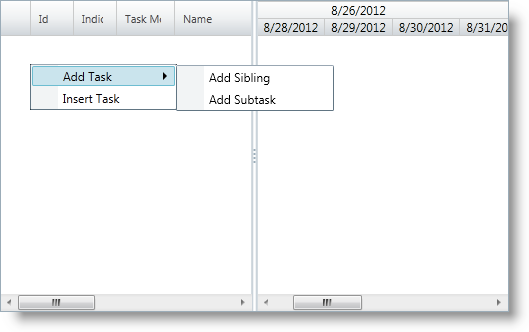
The following screenshot previews the result.
Following is a conceptual overview of the process:
The following steps demonstrate how to instantiate a Project and add it to the xamGantt Project property.
Add required namespace(s) using/Imports in code-behind
Add the following using/Imports namespaces in the code-behind:
In C#:
using Infragistics.Controls.Schedules;In Visual Basic:
Imports Infragistics.Controls.SchedulesCreate an instance of the xamGantt
Create a xamGantt instance in the code-behind:
In C#:
XamGantt gantt = new XamGantt();In Visual Basic:
Dim gantt As New XamGantt()Create an instance of Project
Create a Project instance in the code-behind:
In C#:
Project project = new Project();In Visual Basic:
Dim project As New ProjectSet the xamGantt Project property to the created Project instance
Set the xamGantt Project property to the newly created Project instance in code-behind:
In C#:
gantt.Project = project;In Visual Basic:
gantt.Project = projectAdd the xamGantt control to a Grid container in a page
Add the xamGantt control as a child of a Grid container named LayoutRoot:
In C#:
this.LayoutRoot.Children.Add(gantt);In Visual Basic:
Me.LayoutRoot.Children.Add(gantt)The following topics provide additional information related to this topic.