

The Fastest React Grid
Ignite UI for React provides a complete library of React-native, Material-based UI components, including the world’s fastest virtualized React data grid.
React Grid Example
In this React grid example, you can see how users can customize their data view by leveraging the various features built into the grid, like data search and filtering, columns sorting, resizing, pinning and hiding, row selection, export to excel and csv, horizontal and vertical scrolling. We have provided examples for cell templating that includes components like linear progress bar indicator and sparkline. View more features in this topic.
What is a React Grid?
The React data grid is a component used to display tabular data in a series of rows and columns. Data grids, also known as tables, are well known in the desktop world with popular software such as Microsoft Excel. While grids have been available on desktop platforms for a long time, they have recently become part of web app UIs, such as React UI. Modern grids can be complex and may include a range of functionalities, including data binding, editing, Excel-like filtering, custom sorting, grouping, row reordering, row and column freezing, row aggregation, and exporting to Excel, CSV, and pdf formats.
Why Use a React Grid?
React data grids are essential in use cases where lots of data must be stored and sorted through quickly. This can include industries such as financial or insurance that use high-volume, high-velocity data frequently. Often the success of these companies is dependent on the functionality and performance of these data grids. When stock decisions need to be made in microseconds, for example, it’s imperative that the data grid performs with no lag time or flicker.
Key Features
The Ignite UI for React Data Grid is not just for high-volume and real-time data. It is a feature-rich React grid that gives you capabilities that you would never be able to accomplish with so little code on your own.
Here are a few of the data grid’s key features:
Virtualized Rows and Columns so you can load millions of records
Inline Editing with Cell, and Row Update options
Inline Editing with Cell
Excel-style Filtering and full Excel Keyboard Navigation capability
Interactive Outlook-style Grouping
Column Summaries based on any data in a grid cell or column
Size to adjust the height and sizing of the rows
Data Virtualization and Performance
Seamlessly scroll through unlimited rows and columns in your React grid, with the data grid’s column and row level virtualization. With support for local or remote data sources, you get the best performance no matter where your data lives. Your users will experience Excel-like scrolling, with enterprise speed — no lag, screen flicker, or visual delay — giving you the best user experience (UX) without compromising performance.

Quick and Easy to Customize, Build and Implement
The Ignite UI React Data Grid can handle unlimited rows and columns of data, while providing access to custom templates and real-time data updates. Featuring an intuitive API for easy theming and branding, you can quickly bind to data with minimal code.
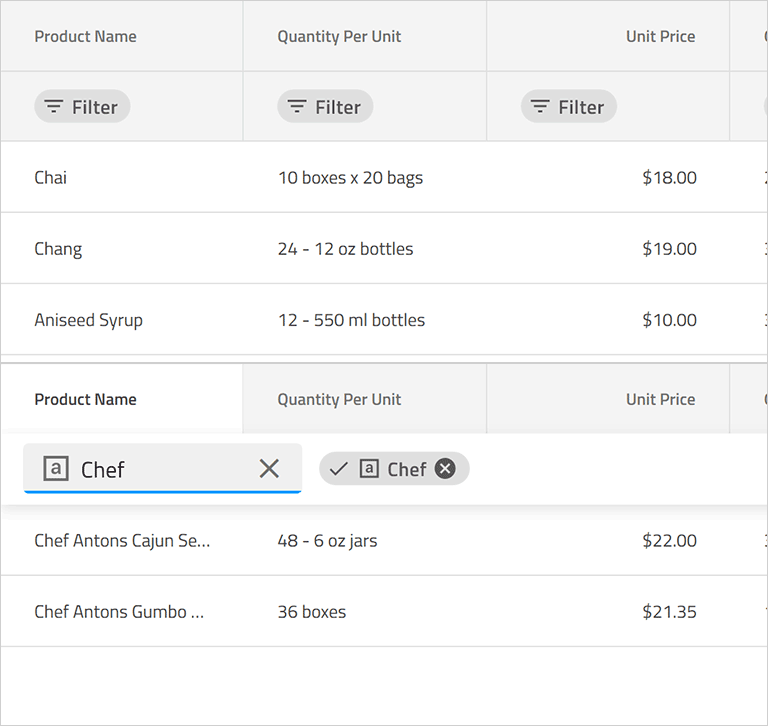
React Grid Paging, Sorting, Filtering, & Searching
Allow users to navigate your data set with our default pager or create your own template to give your own paging experience. With complete support for single and multi-column sorting, full-text search on the grid, and several advanced filtering options, including data-type based Microsoft Excel-style Filtering.
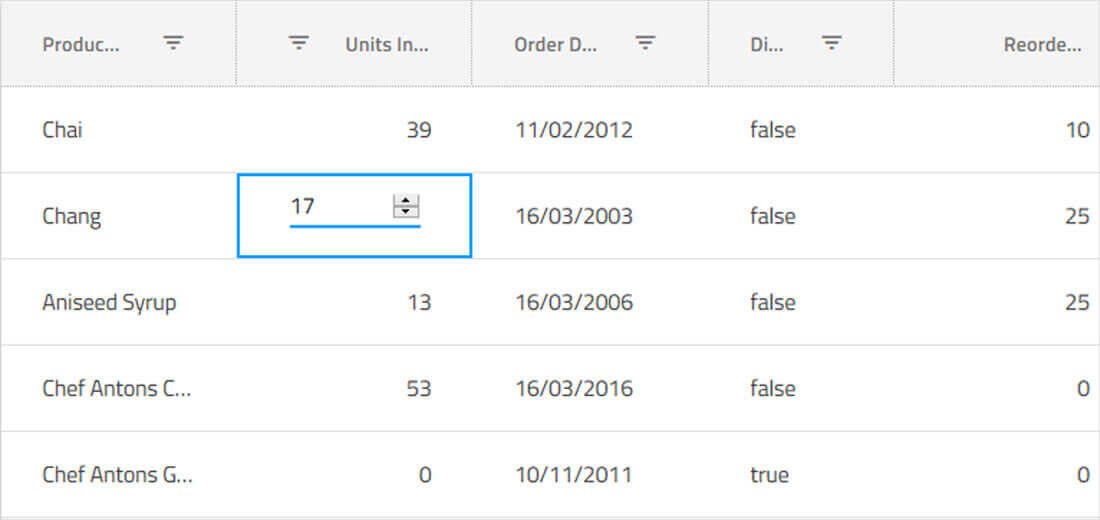
Inline React Grid Editing
We provide you default cell templates for editable columns which are based on the data type of the column. You can define your own custom templates for editable columns and override default behavior for committing and discarding changes in the cell value.
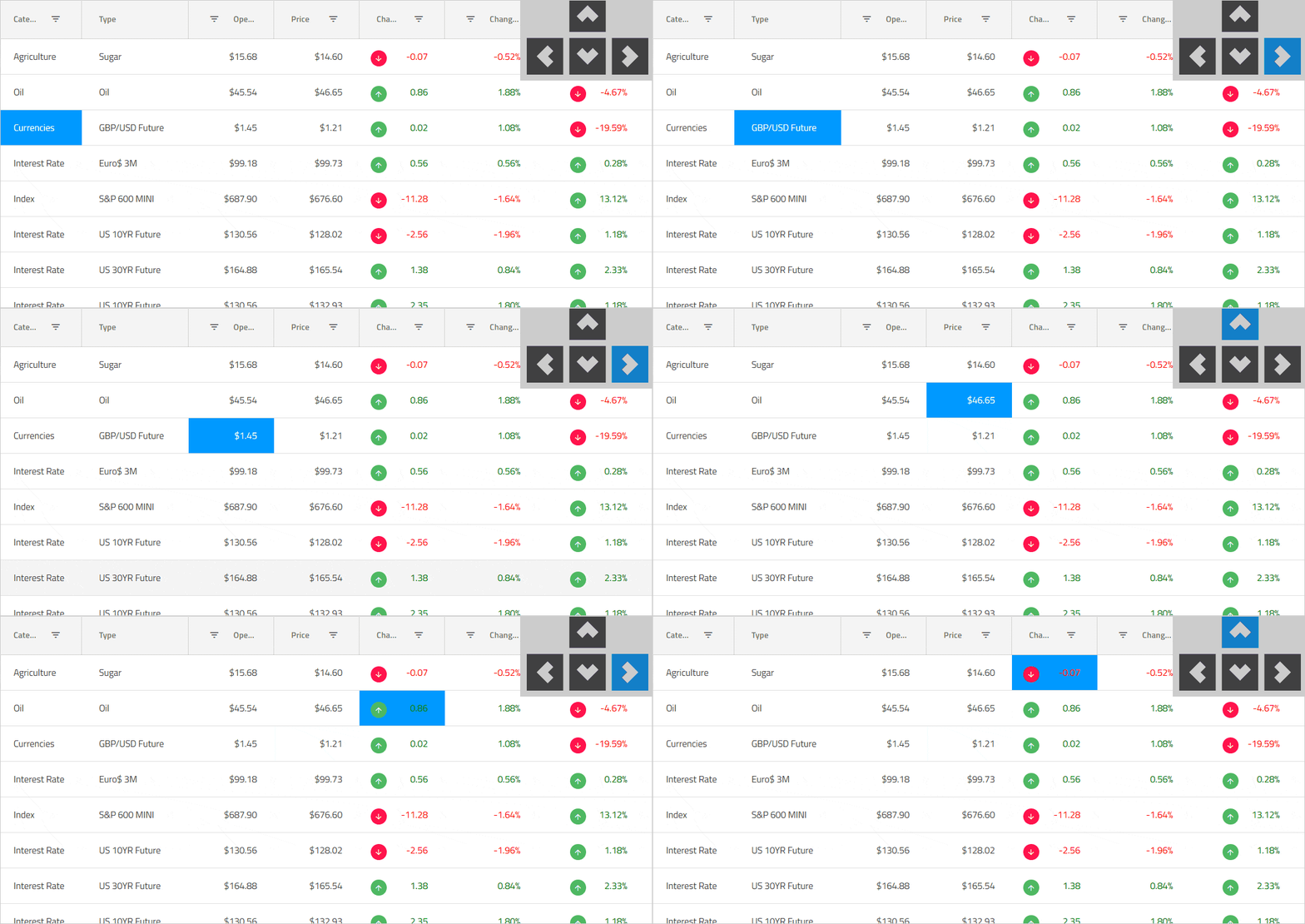
Keyboard Navigation & Row/Cell Selection
Ensure accessibility compliance and improve usability, enabling Excel-like keyboard navigation in the React data grid, using the up, down, right, left, tab, and Enter keys. You can toggle single or multiple row selection in the React grid using the mouse or keyboard to select or de-select full rows, or use the built-in select all / de-select all checkbox in the grid toolbar to work with row selection. Learn about our most recent enhancements to this feature.

React Grid Accessibility & ARIA Support
Each of our React components in Ignite UI for React has been implemented according to the latest accessibility guidelines and specifications. Our React components have been tested using OS or Browser provided accessibility technology – screen readers. Our team ensures not only that the guidelines are implemented, but also that the actual content delivered to visually impaired or blind people is actually consumable and user-friendly for them. The Ignite UI for React data grid is fully accessible with a11y Keyboard accessibility, ARIA, and accessible color palette. Learn more.
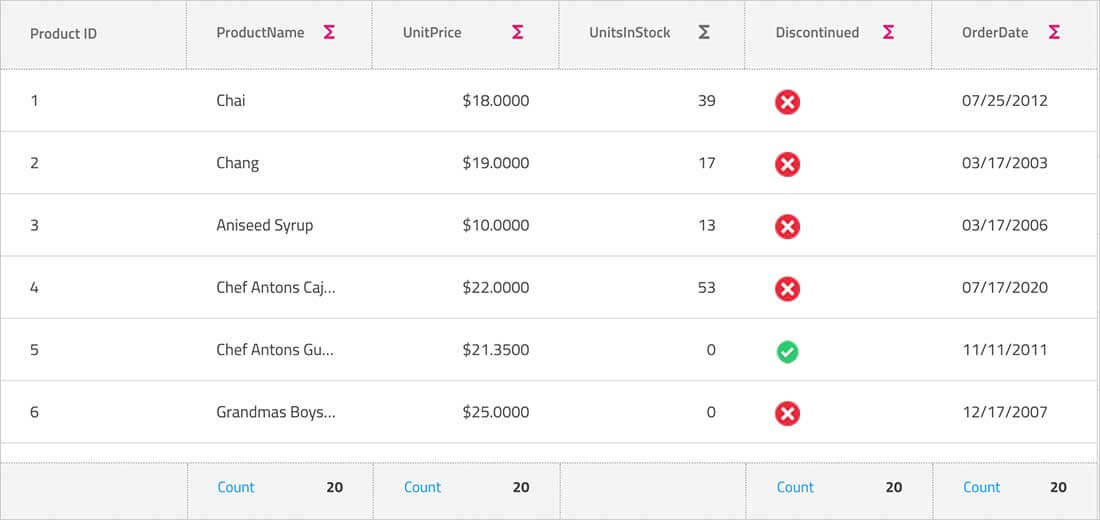
Column Grouping, Pinning, Summaries
Group columns or pre-set column groups via mouse interaction, touch or our API, with support for built-in column summaries or custom summary templates. Enable users to interactively hide or move columns, with full support for interactive column pinning, during move, drag, and reorder operations.
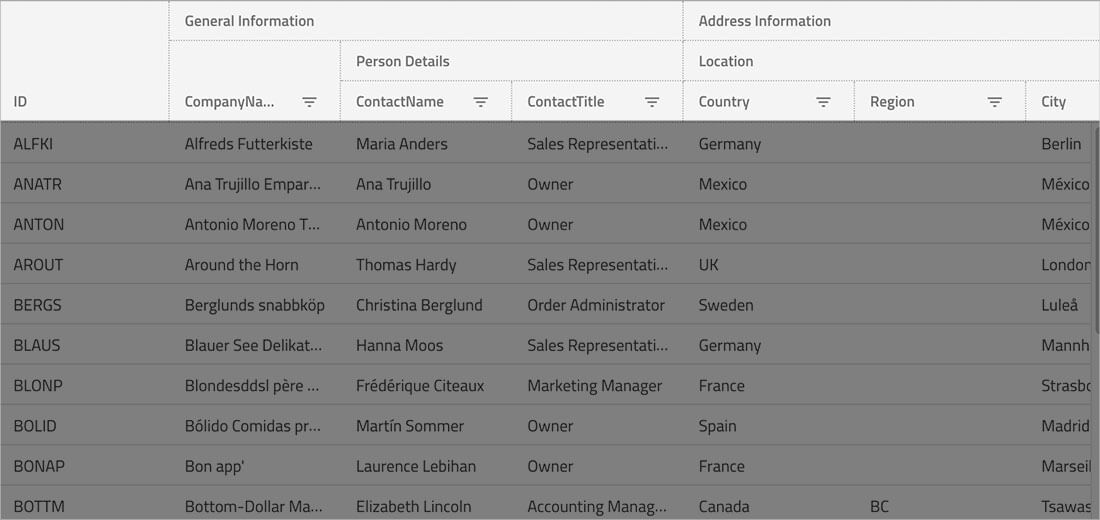
Multi-Column Headers
Enable multi-column headers, allowing you to group columns under a common header. Every column group could be a representation of combinations between other groups or columns, with full support for column pinning, interactive column moving within groups, sorting, and hiding groups.
React Grid Features
Download the Fastest React Grid Today!
30 days free trial. No credit card required.
Ignite UI for React Supported Browsers
The React Data Grid is supported on all modern web browsers, including:
- Chrome
- Edge / Edge Chromium
- Firefox
- Safari
'%20d='M96%20183.4A63.7%2063.7%200%200%201%2072.6%20160L17.2%2064A128%20128%200%200%200%20128%20256l55.4-96A64%2064%200%200%201%2096%20183.4Z'/%3e%3cpath%20fill='url(%23b)'%20d='M192%20128a63.7%2063.7%200%200%201-8.6%2032L128%20256A128%20128%200%200%200%20238.9%2064h-111a64%2064%200%200%201%2064%2064Z'/%3e%3ccircle%20cx='128'%20cy='128'%20r='52'%20fill='%231a73e8'/%3e%3cpath%20fill='url(%23c)'%20d='M96%2072.6a63.7%2063.7%200%200%201%2032-8.6h110.8a128%20128%200%200%200-221.7%200l55.5%2096A64%2064%200%200%201%2096%2072.6Z'/%3e%3c/svg%3e)
'%20x:href='%23a'%3e%3cstop%20offset='.76'%20stop-opacity='0'/%3e%3cstop%20offset='.95'%20stop-opacity='.5'/%3e%3cstop%20offset='1'/%3e%3c/radialGradient%3e%3cradialGradient%20id='f'%20cx='2523'%20cy='4680'%20r='20243'%20gradientTransform='matrix(-.03715%20.99931%20-2.12836%20-.07913%2013579%203530)'%20x:href='%23a'%3e%3cstop%20offset='0'%20stop-color='%2335c1f1'/%3e%3cstop%20offset='.11'%20stop-color='%2334c1ed'/%3e%3cstop%20offset='.23'%20stop-color='%232fc2df'/%3e%3cstop%20offset='.31'%20stop-color='%232bc3d2'/%3e%3cstop%20offset='.67'%20stop-color='%2336c752'/%3e%3c/radialGradient%3e%3cradialGradient%20id='g'%20cx='24247'%20cy='7758'%20r='9734'%20gradientTransform='matrix(.28109%20.95968%20-.78353%20.22949%2024510%20-16292)'%20x:href='%23a'%3e%3cstop%20offset='0'%20stop-color='%2366eb6e'/%3e%3cstop%20offset='1'%20stop-color='%2366eb6e'%20stop-opacity='0'/%3e%3c/radialGradient%3e%3cpath%20id='h'%20d='M24105%2020053a9345%209345%200%2001-1053%20472%2010202%2010202%200%2001-3590%20646c-4732%200-8855-3255-8855-7432%200-1175%20680-2193%201643-2729-4280%20180-5380%204640-5380%207253%200%207387%206810%208137%208276%208137%20791%200%201984-230%202704-456l130-44a12834%2012834%200%20006660-5282c220-350-168-757-535-565z'/%3e%3cpath%20id='i'%20d='M11571%2025141a7913%207913%200%2001-2273-2137%208145%208145%200%2001-1514-4740%208093%208093%200%20013093-6395%208082%208082%200%20011373-859c312-148%20846-414%201554-404a3236%203236%200%20012569%201297%203184%203184%200%2001636%201866c0-21%202446-7960-8005-7960-4390%200-8004%204166-8004%207820%200%202319%20538%204170%201212%205604a12833%2012833%200%20007684%206757%2012795%2012795%200%20003908%20610c1414%200%202774-233%204045-656a7575%207575%200%2001-6278-803z'/%3e%3cpath%20id='j'%20d='M16231%2015886c-80%20105-330%20250-330%20566%200%20260%20170%20512%20472%20723%201438%201003%204149%20868%204156%20868a5954%205954%200%20003027-839%206147%206147%200%20001133-850%206180%206180%200%20001910-4437c26-2242-796-3732-1133-4392-2120-4141-6694-6525-11668-6525-7011%200-12703%205635-12798%2012620%2047-3654%203679-6605%207996-6605%20350%200%202346%2034%204200%201007%201634%20858%202490%201894%203086%202921%20618%201067%20728%202415%20728%202952s-271%201333-780%201990z'/%3e%3cuse%20fill='url(%23b)'%20x:href='%23h'/%3e%3cuse%20fill='url(%23d)'%20opacity='.35'%20x:href='%23h'/%3e%3cuse%20fill='url(%23c)'%20x:href='%23i'/%3e%3cuse%20fill='url(%23e)'%20opacity='.4'%20x:href='%23i'/%3e%3cuse%20fill='url(%23f)'%20x:href='%23j'/%3e%3cuse%20fill='url(%23g)'%20x:href='%23j'/%3e%3c/svg%3e)


Ignite UI for React Support Options
There are multiple options to get access to our award-winning support at Infragistics for the React product.
- Start at the React Support home page
- Read the React Documentation and experiment with React Samples
- Read the React Blogs to stay up to date
- Submit a Support Case
- Learn from the React Reference Applications
Ignite UI for React Trial License and Commercial
Ignite UI for React is a commercially licensed product available via a subscription model. You can try the Ignite UI for React product for free when you register for a 30-day trial. When you are done with your Trial Period, you can purchase a license from our web site or by calling sales in your region.
Frequently Asked Questions
- Virtualized Rows and Columns so you can load millions of records
- Inline Editing with Cell, Row
- Excel-style Filtering and full Excel Keyboard Navigation capability
- Interactive Outlook-style Grouping
- Column Summaries based on any data in a grid cell or column
- Export to Excel
- Size to adjust the height and sizing of the rows
Our React components are included as a part of our Ignite UI bundle. A single developer license starts at $1,295 USD for a one-year subscription, including one year of standard support and updates. We also offer discounts for multi-year licenses. Please refer to our Pricing page for more information on pricing.
If you are developing applications on multiple platforms, consider our complete app development package, Infragistics Ultimate, which include desktop platforms like WPF and Windows Forms, plus all modern web toolsets for React, Web Components, ASP.NET MVC and ASP.NET Core.
No, you cannot purchase the React Data Grid separately. It is part of a the Ignite UI for React product, which includes dozens of UI controls and components, plus over 60 charts, including React Financial Charting. If you are interested in other modern web platforms like Angular, ASP.NET MVC, Web Components or ASP.NET Blazor, check out our Ignite UI product bundle, which gives you every web platform for only $100 more on your subscription. That is hundreds of controls, components, and data visualizations for a very low price.
To get started with the React Data Grid, follow the steps in the getting started guide. We also maintain a library of sample applications, which are designed to not only inspire but are best practices guides for React development.