• North American Sales: 1-800-231-8588
  • Global Contacts
  • My Account
Infragistics logo Infragistics logo
Menu
  • North American Sales: 1-800-321-8588
  • My Account
    • Sign In/Register
  • Design & DevelopmentDesign & Develop
    • Best Value
      Infragistics Ultimate The complete toolkit for building high performing web, mobile and desktop apps.
      Indigo.Design Use a unified platform for visual design, UX prototyping, code generation and application development.
    • Web
      Ignite UI for Angular Ignite UI for JavaScript Ignite UI for React Ignite UI for Web Components Ignite UI for Blazor Ultimate UI for ASP.NET Indigo.Design
    • Desktop
      Ultimate UI for Windows Forms Ultimate UI for WPF
      Prototyping
      Indigo.Design
    • Mobile
      Ultimate UI for Xamarin Ultimate UI for iOS Ultimate UI for Android
    • Automated Testing Tools
      Test automation for Micro Focus UFT: Windows Forms Test automation for Micro Focus UFT: WPF Test automation for IBM RFT: Windows Forms
  • UX
    • Indigo.Design Desktop Collaborative prototyping and remote usability testing for UX & usability professionals
    • Indigo.Design A Unified Platform for Visual Design, UX Prototyping, Code Generation, and App Development
  • Business Intelligence
    • Reveal Embedded Accelerate your time to market with powerful, beautiful dashboards into your apps
    • Reveal App Empower everyone in your organization to use data to make smarter business decisions
  • Team Productivity
  • Learn & SupportSupport
    • Help & Support Documents
    • Blogs
    • Forums
    • Product Ideas
    • Reference Applications
    • Customer Stories
    • Webinars
    • eBook & Whitepapers
    • Events
  • Free Trials
  • Pricing
    • Product Pricing / Buy Online
    • Renew Existing License
    • Contact Us
 
Ignite UI | Components
  • Download Trial
Your Privacy Matters: We use our own and third-party cookies to improve your experience on our website. By continuing to use the website we understand that you accept their use. Cookie Policy
Close
  • Grids & Lists
    • Data Grid
    • Hierarchical Grid
    • OLAP Pivot Data Selector
    • OLAP Pivot Grid
    • OLAP Pivot View
    • Spreadsheet
    • Tree Grid
    • Tree List
  • Charts
    • Category Chart
    • Data Chart
    • Doughnut Chart
    • Financial Chart
    • Funnel Chart
    • Pie Chart
    • Shape Chart
    • Sparkline
  • Gauges
    • Bullet Graph
    • Linear Gauge
    • Radial Gauge
  • Barcodes
    • Barcode
  • Data Visualization
    • Geographic Map
    • Zoombar
  • Data Entry and Display
    • Editors
    • Combo Box Editor
    • HTML Editor
    • Notifier
    • Rating
    • Validator
  • Interactions
    • Dialog Window
    • File Upload
    • Popover
    • Scrollbar
    • Split Button
    • Video Player
  • Menus
    • Radial Menu
  • Layouts
    • Layout Managers
    • Splitter
    • Tile Manager
  • Styling & Themes
    • Themes
  • Scheduling
    • Schedule
  • Frameworks
    • Data Source
    • Excel Exporter
    • Excel Library
    • Infragistics Documents
    • Infragistics Loader
    • Template Engine
    • Word Exporter
Ignite UI Schedule

Ignite UI Schedule

The Schedule component is used to display and manage appointments with associated resources. One-time and recurring appointments can be displayed in a day, week, or month view; a month view with an agenda split view; or an agenda view. Populate appointments by using the built-in appointment and resource classes, or use your own custom business objects.

View Sample

Appointments

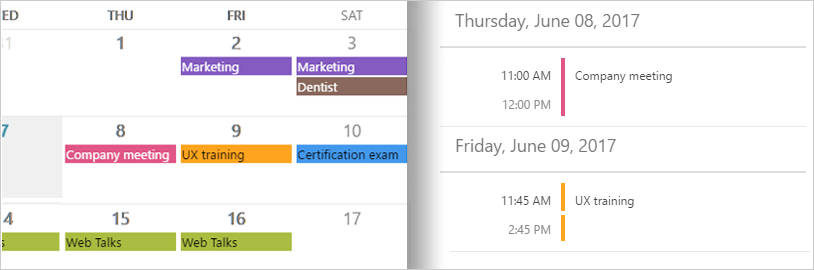
The Appointment is a core concept in a scheduling application, containing all the relevant information about an activity that will occur during some block of time, such as a meeting or an event. The Schedule component allows you to provide a collection of appointments with details such as a start date, end date, subject, and more, that are displayed in one of the four supported views. The Schedule component also provides support for recurring appointments with daily, weekly, monthly, and yearly recurrence patterns.
Ignite UI Appointments View Sample

Resources

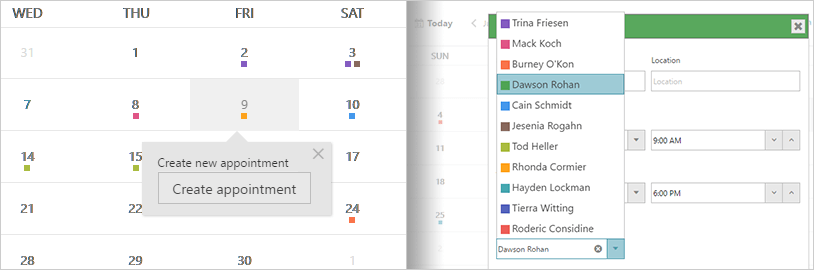
In addition to scheduling appointments, you can also schedule resources, such as the conference room where you plan to hold a meeting or the person responsible for a presentation. Each resource can be assigned a unique color scheme to more easily identify the resource associated with an appointment. Choose from 11 built-in color schemes including Grape, Strawberry, Sky, and Leafy, to name a few.
Ignite UI Resources

Views

The Schedule control provides four different types of views to display dates and appointments: Day, Week, Month, and Agenda.
Ignite UI Agenda

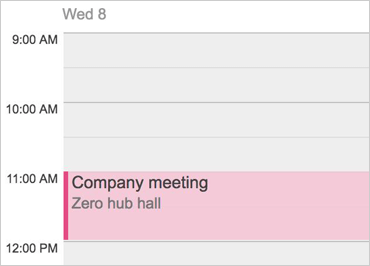
Day View

Presents an hour-based view of a single day with configurable timeslot segments, or contiguous view of up to seven days at one time. Set working hours for each day of the week, display all-day events for single or multiple days, and show resources such as people, equipment, conference rooms, and more.
Ignite UI Agenda

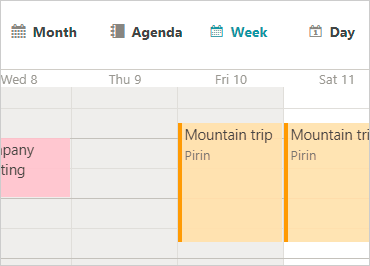
Week View

Presents a seven-day week or configurable workweek, showing activities and working hours for all days. Customize working and nonworking days and show resources for events scheduled during the week.

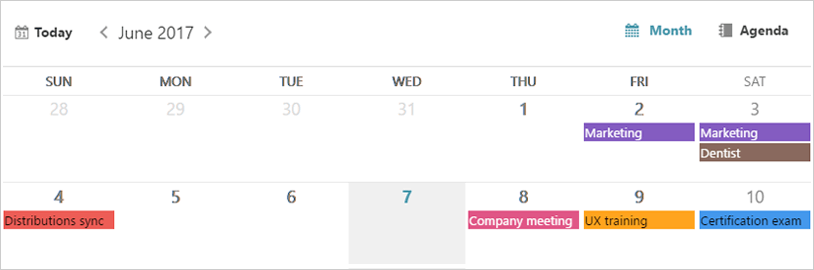
Month View

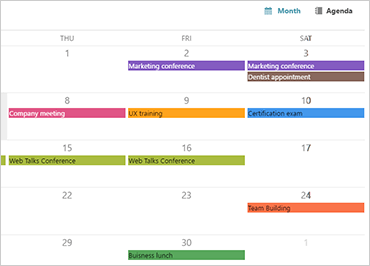
Presents a month-based view of the calendar in which the weeks of the month are arranged vertically going from top to bottom and the days of the week are arranged horizontally. The month view displays a split agenda view so that appointments can be displayed below the month for the selected date. If the agenda split view is not needed, it can easily be removed.
Ignite UI Views View Sample
Ignite UI Agenda

Agenda

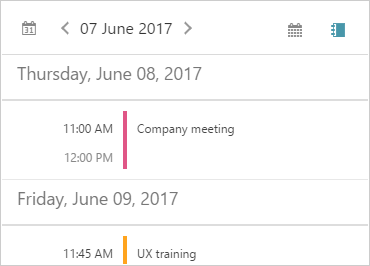
The Agenda view shows a full list of all scheduled appointments. This allows you to focus only on upcoming scheduled events. Scroll appointments to see what’s coming up next.

View Sample
Ignite UI Agenda

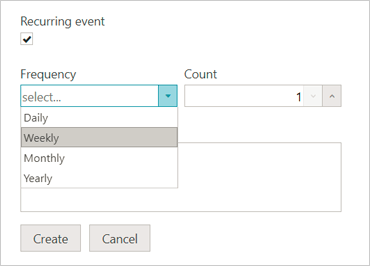
Recurrences

Enable users to set up recurring activities using a set of pattern rules.

Celebrating 30 Years of Amazing Experiences

  • Products
    • Design & Development
    • UX Pros
    • Business Intelligence
    • Team Productivity
    • View All
    • Free Trials
  • Learn & Support
    • Help & API Docs
    • Blogs
    • Technical Support Chat
    • Forums
    • Product Ideas
    • Submit a Request
  • My Account
    • Manage My Subscriptions
    • Support Requests
  • Corporate
    • About Us
    • Careers
    • Legal
    • News & Events
    • Partners
Stay Up-to-Date

Get the latest blogs, eBooks, events, and whitepapers.

Sign Me Up!
  • Privacy Policy(updated)
  • Cookies
  • Terms of Use(updated)
New release! Try Infragistics Ultimate 19.2 FREE for 30 days.
Download Now
© Copyright 2019 INFRAGISTICS. All Rights Reserved
Back to top of page