

Virtual Scroll Component
The Ignite UI for Angular Virtual Scroll is a component that renders large lists by keeping only the items in its viewport, plus a configurable buffer, in the DOM. The scrollbar still spans the whole collection, so a virtual list of a hundred thousand items scrolls like a regular list.
Live Demo
Anatomy
The Angular Virtual Scroll renders the visible items plus a configurable buffer, and its track preserves the scroll range of the whole collection.

2. Track: A spacer sized to the estimated length of the whole collection, so the scrollbar spans every item.
3. Content element: Holds only the rendered items. It starts at the first rendered buffer item, above the viewport, and takes its size from the rendered items.
4. Item wrapper: One per rendered item. It hosts the item template and is the box that gets measured.
5. Over-scan buffer: The
overScan items (2 by default) rendered past each edge of the viewport.
igx-virtual-scroll                      — scrollable viewport (role="list")
└── .igx-virtual-scroll__track          — provides the collection's scroll range
    └── .igx-virtual-scroll__content    — positions the rendered window
        └── .igx-virtual-item           — one wrapper per rendered item (data-index); hosts the item template
Getting Started
Set up Ignite UI for Angular with the Getting Started topic, then import the VirtualScroll and the IgxVirtualItemDirective, which marks the item template:
import { Component } from '@angular/core';
import { IgxVirtualItemDirective, IgxVirtualScrollComponent } from 'igniteui-angular/virtual-scroll';

@Component({
    selector: 'app-employees',
    imports: [IgxVirtualScrollComponent, IgxVirtualItemDirective],
    templateUrl: './employees.component.html'
})
export class EmployeesComponent {
    public items = Array.from({ length: 100_000 }, (_, i) => ({ name: `Item ${i}` }));
}<igx-virtual-scroll [data]="items" style="height: 400px">
<ng-template igxVirtualItem let-item let-index="index">
<div class="row">{{ index }}: {{ item.name }}</div>
</ng-template>
</igx-virtual-scroll>The Virtual Scroll host needs a fixed height for vertical scrolling or a fixed width for horizontal scrolling. A host that grows with its content renders every item, so the list is not virtualized.
Prerequisites and Version Compatibility
| Requirement | Value |
|---|---|
| Package | igniteui-angular (MIT) |
| Entry point | igniteui-angular/virtual-scroll |
| First release with the component | 22.2.0 |
Usage
Item Template
The Virtual Scroll item template receives the item and its position in the whole collection. Use the index and the total count for position-dependent content, such as alternating styles or aria-posinset and aria-setsize.
Mark an ng-template with igxVirtualItem, or pass a template defined elsewhere through itemTemplate, which takes precedence. The template context provides $implicit (the item), index, count, first, last, even, and odd.
<igx-list>
    <igx-virtual-scroll role="presentation" [data]="employees" [estimatedItemSize]="64" style="height: 480px">
        <ng-template igxVirtualItem let-employee let-index="index" let-count="count">
            <igx-list-item [attr.aria-posinset]="index + 1" [attr.aria-setsize]="count">
                <igx-avatar igxListThumbnail shape="circle" [initials]="employee.initials"></igx-avatar>
                <span igxListLineTitle>{{ employee.name }}</span>
                <span igxListLineSubTitle>{{ employee.email }}</span>
            </igx-list-item>
        </ng-template>
    </igx-virtual-scroll>
</igx-list>
Data
The Virtual Scroll data collection is compared by reference. Assign a new array to update the list; changing the bound array in place, for example with push, does not update it.
this.employees = [...this.employees, newEmployee];When data changes, the component keeps the measured sizes of the items before the first changed index and measures the rest again when they render. Appending keeps every existing measurement; replacing, filtering, or sorting discards the measurements from the first changed item onwards.
Estimated Item Size
The Virtual Scroll estimatedItemSize is the size in pixels an item has until it renders and is measured (50 by default). Items can have different sizes: each measured size replaces the estimate.
Set the estimate close to the average item size to keep the scrollbar and scrollToIndex accurate before items are measured.
<igx-virtual-scroll [data]="employees" [estimatedItemSize]="80" style="height: 480px">...</igx-virtual-scroll>Items are measured by their border box, so margins are not part of an item’s size. Space items with padding, or with a gap inside the item, instead of margins.
Orientation
The Virtual Scroll orientation sets the scroll axis: vertical (default) or horizontal. In a horizontal list, give each item a width and the host a height. In a right-to-left context, horizontal scrolling and item positioning are mirrored.
<igx-virtual-scroll orientation="horizontal" [data]="employees" [estimatedItemSize]="220" style="height: 200px">
    <ng-template igxVirtualItem let-employee>
        <div style="width: 220px">...</div>
    </ng-template>
</igx-virtual-scroll>
Over-Scan
The Virtual Scroll overScan is the number of extra items rendered beyond each edge of the viewport (2 by default). A larger value reduces blank areas during fast scrolling and renders more elements.
<igx-virtual-scroll [data]="items" [overScan]="6" style="height: 400px">...</igx-virtual-scroll>Scroll to Index
The Virtual Scroll scrollToIndex method scrolls an item into view. Its options are those of the native scrollIntoView: block (start, center, end, or nearest), inline for a horizontal list, and behavior (auto or smooth). Items that have not rendered only have an estimated size, so the component measures the items where it lands and corrects the position; the returned promise resolves on the final position.
private readonly virtualScroll = viewChild.required(IgxVirtualScrollComponent);

public async goTo(index: number): Promise<void> {
    await this.virtualScroll().scrollToIndex(index, { block: 'center' });
}
With block: 'nearest', the position does not change when the item is already fully visible. Indices outside the collection are clamped to the first or last item.
Infinite Scroll
The Virtual Scroll dataRequest output supports append-only loading from remote data. It is emitted when the rendered window nears the end of data, and on the first render when the loaded items do not fill the viewport. Append the requested items as a new array:
<igx-virtual-scroll [data]="employees()" [estimatedItemSize]="64" (dataRequest)="loadMore($event)" style="height: 440px">
    <ng-template igxVirtualItem let-employee>...</ng-template>
</igx-virtual-scroll>
public readonly employees = signal<Employee[]>(firstPage);
public loadMore(request: VirtualScrollDataRequest): void {
this.service.fetch(request.startIndex, request.count).subscribe(page => {
this.employees.update(current => [...current, ...page]);
});
}Only one data request is pending at a time; the next one follows the next data change. An empty data emits no request, so load the first page yourself. When the source has no more items, stop appending: the component does not request the same start index again.
Paged Data
The Angular Virtual Scroll dataWindow input binds a page of a larger collection instead of data. The list is as long as totalCount, so the scrollbar spans the whole collection while only the page is in memory, and indices that the page does not cover render nothing.
interface VirtualDataWindow<T> {
    readonly items: readonly T[]; // the loaded page
    readonly startIndex: number;  // the index of items[0] in the whole collection
    readonly totalCount: number;  // the size of the whole collection
}
Load the next page from the range that stateChange reports. Cancel the previous request, so a slow response cannot replace a newer page:
<igx-virtual-scroll [dataWindow]="page()" [estimatedItemSize]="64" (stateChange)="onStateChange($event)" style="height: 440px">
    <ng-template igxVirtualItem let-employee>...</ng-template>
</igx-virtual-scroll>
public readonly page = signal<VirtualDataWindow<Employee>>({ items: [], startIndex: 0, totalCount: 100_000 });
private pending?: Subscription;
public onStateChange(state: VirtualScrollState): void {
const page = this.page();
if (state.startIndex >= page.startIndex && state.endIndex < page.startIndex + page.items.length) {
return; // The loaded page already covers the range.
}
const startIndex = Math.max(0, state.startIndex - 30);
const count = state.endIndex + 30 - startIndex + 1;
this.pending?.unsubscribe();
this.pending = this.service.fetch(startIndex, count).subscribe(result => {
this.page.set({ items: result.items, startIndex, totalCount: result.total });
});
}Measured sizes are kept per index while totalCount stays the same; a page with a different totalCount, such as a filtered result, is measured again. dataRequest is not emitted while dataWindow is bound. The component stores one size entry per index, so its memory grows with totalCount: roughly 17 MB for a million items.
Layout Complete
The Virtual Scroll layoutComplete property is a promise that resolves when the current render, the measurements it triggers, and the renders they schedule are complete. Await it before you read rendered items after a data change, a scroll, or a resize.
this.employees = await firstValueFrom(this.service.fetchAll());
await this.virtualScroll().layoutComplete;
Do/Don’t
The Virtual Scroll usually works as the scroll container of a long list, keeping only the items in its viewport, plus a small buffer, in the DOM. Avoid it for a list short enough to render at once, and as you write the item template, keep each item state in the data rather than in its elements: item elements are reused, so DOM state the template does not bind shows on whichever item takes the element.
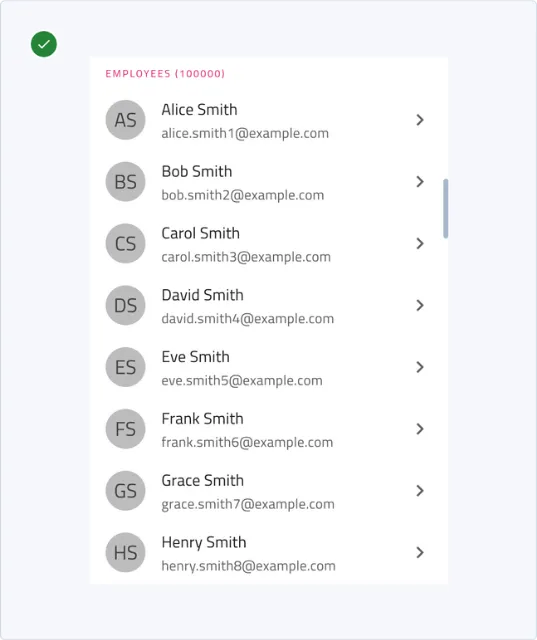
Use the Virtual Scroll for a long list that is too large to render at once, such as a directory, a feed, a log, or a strip of cards, including lists that load remote data while scrolling.

Render a short list directly with the List and @for. Use the Angular Data Grid for tabular data with columns, sorting, or filtering. Show a small set of rich items as Card elements without virtualization.
Properties
| Name | Type | Default | Description |
|---|---|---|---|
data |
T[] |
[] |
The collection to virtualize. Compared by reference. |
dataWindow |
VirtualDataWindow<T> | null |
null |
A page of a larger collection, used instead of data while it is set. |
orientation |
'vertical' | 'horizontal' |
'vertical' |
The scroll axis. |
overScan |
number |
2 |
Extra items rendered beyond each edge of the viewport. |
estimatedItemSize |
number |
50 |
The size in pixels of an item until it is measured. A non-positive value uses 50. |
itemTemplate |
TemplateRef<IgxVsItemContext<T>> | null |
null |
The item template. Takes precedence over a projected ng-template[igxVirtualItem]. |
layoutComplete |
Promise<void> (read-only) |
— | Resolves when rendering and item measurement have settled. |
Methods
| Name | Returns | Description |
|---|---|---|
scrollToIndex(index: number, options?: ScrollIntoViewOptions) |
Promise<void> |
Scrolls the item at index into view and resolves when the corrected position is stable. |
Events
| Name | Payload | Description |
|---|---|---|
stateChange |
VirtualScrollState |
Emitted when the rendered window changes: startIndex, endIndex, viewportSize, totalSize. |
dataRequest |
VirtualScrollDataRequest |
Emitted when the rendered window nears the end of data: startIndex, count. Not emitted while dataWindow is bound. |
Styling
The Angular Virtual Scroll has no theme of its own: it lays out the viewport, and the rendered items take their styles from the elements and components in the item template.
Size the host and target the rendered items with the classes from the Anatomy:
.employees igx-virtual-scroll {
    block-size: 480px;
}

.employees .igx-virtual-item:nth-child(even) {
    background: var(--ig-gray-100);
}
Accessibility
The Angular Virtual Scroll keeps only the rendered window in the DOM, so the item template has to expose each item’s position in the whole collection.
Keyboard Interaction
The Angular Virtual Scroll adds no key handlers. The host is a native scroll container, and a focused scroll container scrolls with the browser’s keys:
| Key | Action |
|---|---|
| Arrow Up / Arrow Down | Scrolls a vertical list. |
| Arrow Left / Arrow Right | Scrolls a horizontal list. |
| Page Up / Page Down | Scrolls by about one viewport. |
| Home / End | Scrolls to the start or the end of the collection. |
The host has no tabindex. Browsers differ in whether a scroll container without focusable content can receive focus, so set tabindex="0" on the host when the items contain nothing focusable. Focus inside an item does not survive that item leaving the rendered window, so move focus deliberately before it does.
Screen Readers / ARIA
- The host has
role="list"; the track, the content element, and the item wrappers haverole="presentation". Items that renderrole="listitem", such asigx-list-item, are exposed as items of that list. - Inside a container that already provides list semantics, such as
igx-list, setrole="presentation"on the host so that the items are not nested in a second list. - Map the
indexandcounttemplate variables toaria-posinsetandaria-setsize. - Give a focusable host an accessible name with
aria-labeloraria-labelledby.
Accessibility Compliance
Infragistics documents the accessibility standards that Ignite UI for Angular targets in the Accessibility Compliance topic. This topic makes no conformance claim for the Virtual Scroll: the table lists what the component provides, and the list after it covers what the application must add.
| Criterion | How the component supports the requirement |
|---|---|
| 1.3.1 Info and Relationships | The wrappers are presentational, so the list structure comes from the host and the item template, which can expose each item’s position with aria-posinset and aria-setsize. |
| 2.1.1 Keyboard | The host is a native scroll container that scrolls with the keyboard once it has focus. Reaching it with the keyboard depends on the application; see the list below. |
Your responsibilities:
- Make the host keyboard-reachable with
tabindex="0"when the items contain nothing focusable, and give it an accessible name. - Expose the item position with
aria-posinsetandaria-setsizefrom the item template. - Provide list semantics that fit the item template (see Screen Readers / ARIA).
- Keep application state, such as a selection, in the data rather than in the rendered item elements.
Troubleshooting
Why does the Virtual Scroll render no items?
The host has no size on the scroll axis, the item template is missing, or data is empty. Give the host a fixed height (vertical) or width (horizontal), set the item template, and check the bound collection.
Why does the list not update when I add an item?
The Virtual Scroll compares data by reference, so a change in place is not detected. Assign a new array, for example [...items, newItem].
Why does the scrollbar change size while I scroll?
Items that have not rendered use estimatedItemSize, and the total size is corrected as items are measured.
Set estimatedItemSize close to the average item size.
Why do items drift out of place further down the list?
Margins are not part of an item’s measured size. Replace item margins with padding, or with a gap inside the item.
Why does a list inside a drop-down or dialog show its items one frame late?
A container that is hidden until it opens has no size in the change detection pass that reveals it, so the host is measured after that render and the items render in the next frame. Read the rendered items after layoutComplete resolves.
How do I replace an igxForOf list with the Virtual Scroll?
The Virtual Scroll measures items at runtime and creates its own scroll container, so the container size and scroll container inputs of igxForOf have no equivalent. The igxForOf directive is deprecated in favor of the Virtual Scroll; existing lists keep working, but use the Virtual Scroll for new lists that virtualize a single axis.
| igxForOf | Virtual Scroll |
|---|---|
*igxFor="let item of data" |
[data]="data" with an ng-template igxVirtualItem |
igxForScrollOrientation |
orientation |
igxForContainerSize |
The host’s height or width, set with CSS |
igxForItemSize |
estimatedItemSize (a starting estimate; items are measured) |
igxForScrollContainer |
Not needed: the host is the scroll container |
scrollTo(index) |
scrollToIndex(index, options), which returns a promise |
chunkLoad, chunkPreload |
stateChange |
igxForTotalItemCount for remote data |
dataWindow with totalCount, or data with dataRequest for append-only loading |
index, count, first, last, even, odd |
The same template variables |
The grids keep their own row and column virtualization; see Grid Virtualization.
Known Limitations
-
The Angular Virtual Scroll virtualizes one axis. Rows and columns that are both virtualized require a grid.
-
Item elements are reused as the window moves, so DOM state that the item template does not bind, such as a checkbox without a bound
checked, shows on whichever item takes the element. Bind all item state, and write user changes back to the item. -
With
dataWindow, a page that keepstotalCountbut places different records at the same indices keeps the measured sizes of the previous records until those rows render again.
API References
Dependencies
The Angular Virtual Scroll has no dependencies on other components. Import IgxVirtualScrollComponent and IgxVirtualItemDirective from igniteui-angular/virtual-scroll; the structural styles ship with the component.
Additional Resources
Related Components
- List - Use the List for a short list, or as the container of a virtualized list.
- Data Grid - Use the Data Grid for tabular data with columns, sorting, or filtering.
- Card - Use cards for a small set of rich items, or as items of a horizontal Virtual Scroll.
- Virtual ForOf Directive - The directive-based virtualization used by existing lists.
FAQ
The Angular Virtual Scroll keeps only the items in its viewport and the over-scan buffer in the DOM, so the size of the collection does not change how many elements render. When the total size of a collection exceeds the browser’s scroll limit, the Virtual Scroll maps the collection onto the scroll range the browser supports.
Items in the Angular Virtual Scroll can have different sizes, because each item is measured once it renders. Set estimatedItemSize close to the average item size so that the scrollbar is accurate before items are measured.
Call the Angular Virtual Scroll scrollToIndex method with the item index and optional block and behavior options. The method returns a promise that resolves when the corrected position is stable.
The Angular Virtual Scroll supports two models. For append-only loading, handle dataRequest and assign a new array that includes the requested items. For a collection read a page at a time, bind dataWindow and load the range that stateChange reports.